Amazon ACOS: What It Is and How to Reduce It

Shivam Kumar
TL;DR
Key takeaways
ACOS (advertising cost of sales) is ad spend divided by ad-attributed sales, times 100: $500 spent for $2,000 in sales is 25%.
A good ACOS is set by your margin and goal: break-even ACOS equals your profit margin before ad spend.
To reduce ACOS, cut CPC waste, raise conversion rate or raise order value. Negating search terms and bidding to target ACOS work fastest.
ACOS alone is a trap. Read it next to TACOS and new-to-brand sales before you cut anything.
ACOS is the first number most Amazon advertisers look at and the one they misread most often.
This guide covers what ACOS means, how to calculate it, what a good ACOS is for your margin, and the levers we pull to reduce it in the accounts we manage, with the arithmetic for each one. It also covers when a higher ACOS is the right call.
What Is ACOS on Amazon?
ACOS (advertising cost of sales) is the percentage of ad-attributed sales you spent on Amazon ads to get them. Amazon defines it in its ACOS guide as a metric for measuring pay-per-click campaigns across Sponsored Products, Sponsored Brands and Sponsored Display.
The formula is:
ACOS = (ad spend ÷ ad sales) × 100
If you spend $500 on ads and those ads are credited with $2,000 in sales, your ACOS is 25%. For every dollar of ad sales, you paid 25 cents in clicks.

Lower is more efficient, but lower is not automatically better. A 10% ACOS that comes only from your own brand name can mean you are paying for sales you would have made anyway.
What Counts as an "Ad Sale"
ACOS only counts sales Amazon attributes to a click on your ad. Sponsored Products credits sales within 7 days of a click for sellers and 14 days for vendors. Sponsored Brands and Sponsored Display use 14 days.
That has two practical effects. Yesterday's ACOS is always overstated, because some sales haven't been attributed yet. And sales of other products from your brand count toward the ad that drove the click.
Since January 1, 2026, Sponsored Brands and Sponsored Display campaigns billed on viewable impressions report view-based sales with a new model and a shorter window.
The old totals remain under "Purchases (all views)", so compare the two before deciding a campaign got worse. Our Amazon attribution guide explains the windows in more detail.
What Drives ACOS: CPC, Conversion Rate and Price
The formula Amazon publishes tells you the score. This version tells you what to change:
ACOS = CPC ÷ (conversion rate × average order value)
Take a $30 product with a $1.20 cost per click (CPC) and a 10% conversion rate. Each order needs 10 clicks, so it costs $12 in ad spend, and $12 ÷ $30 is a 40% ACOS.
Now move one input at a time. Cut CPC to $1.00 and ACOS falls to 33%.
Lift conversion rate to 12% and it falls to 33%. Raise the order value to $36 with a bundle and it also falls to 33%.
Every tactic for reducing ACOS works through one of those three numbers. When we audit an account, we first work out which one is broken, because the fix for an expensive click is different from the fix for a listing that doesn't convert.
What Is a Good ACOS on Amazon?
There is no universal good ACOS. Amazon says as much: each brand has a different target, and the first step is to find your break-even ACOS and compare it with your profit margin.
In the accounts we see, healthy mature campaigns often run between 15% and 35%. That range means little until you check it against your own margin.
1. Find Your Break-Even ACOS
Break-even ACOS is your profit margin before ad spend. At that ACOS, an ad-driven sale makes exactly zero profit.
Break-even ACOS = (price − product cost − Amazon fees − other costs) ÷ price

For the $30 product above: $9.00 product cost, a $4.50 referral fee, a $5.20 FBA fee and $1.30 of returns and storage leave $10.00. Break-even ACOS is $10 ÷ $30, or 33.3%.
Amazon's 2026 US fee update raised FBA fulfillment fees by an average of $0.08 per unit from January 15, 2026. Small per unit, but it moves break-even on every low-priced ASIN.
Our break-even ACOS guide and FBA fees breakdown have the inputs.
2. Set a Target ACOS for Each Goal
Target ACOS is the ACOS you bid toward, chosen for what the product needs right now. To keep $3.00 profit on each ad sale of that $30 product, target ($10 − $3) ÷ $30 = 23.3%.
Goal | Where target ACOS sits | Example ($30 product, 33% break-even) |
|---|---|---|
Profit on a mature product | Well below break-even | 20% to 25% |
Growth in a competitive category | Close to break-even | 28% to 33% |
Product launch or ranking push | At or above break-even, for a set period | 33% to 45% |
Brand defense on your own name | Low, because the clicks are cheap and convert | 5% to 15% |
Clearing old stock | Above break-even if storage costs more | Case by case |
Set targets per product, not per account. A 30% account target is too loose for a 25%-margin ASIN and too tight for a 55%-margin one.
ACOS vs TACOS vs ROAS
These three metrics use the same ad spend and answer different questions.
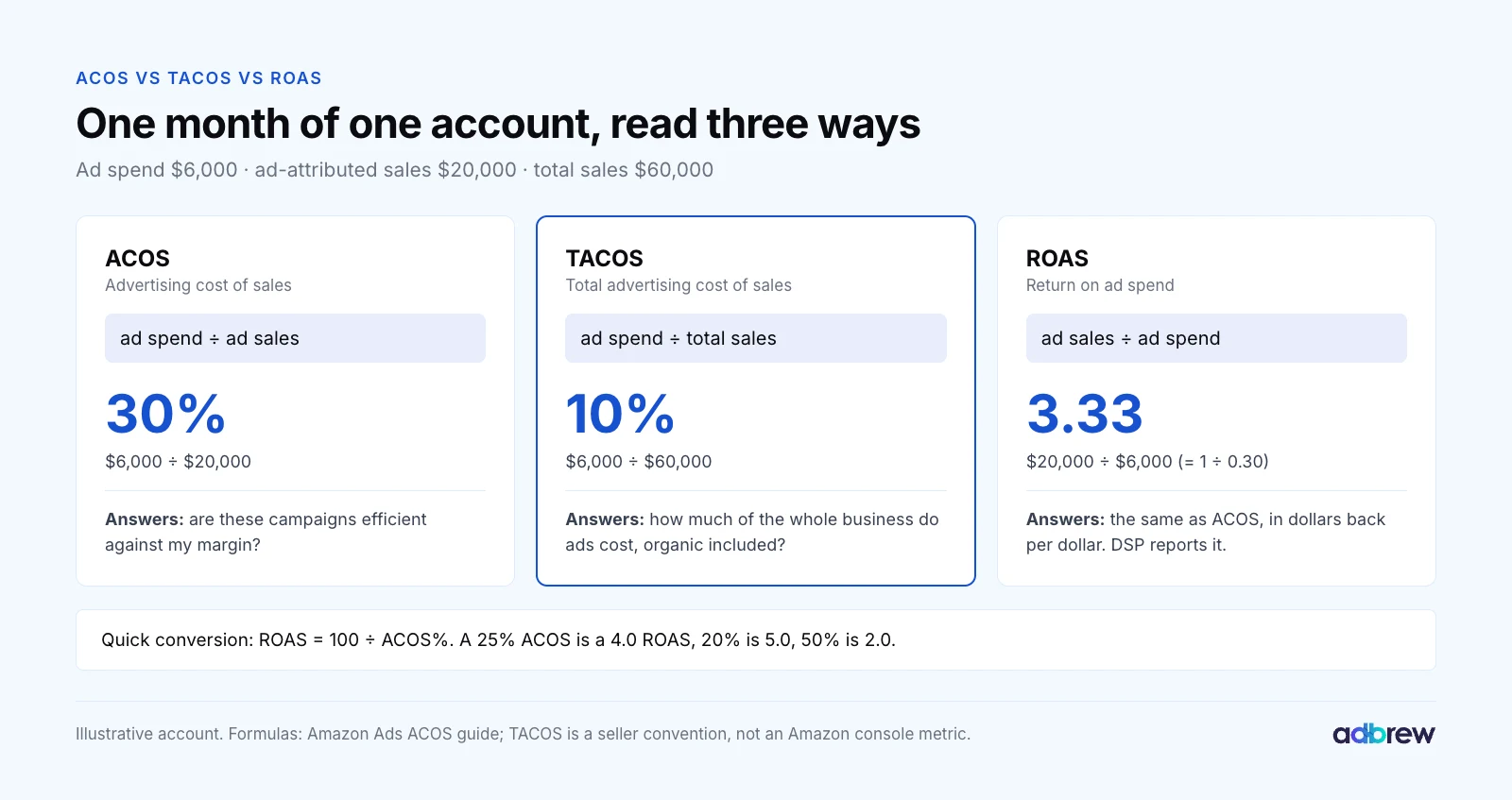
Metric | Formula | What it tells you |
|---|---|---|
ACOS | Ad spend ÷ ad sales × 100 | Whether campaigns are efficient against your margin |
TACOS | Ad spend ÷ total sales × 100 | How much of the whole business ads cost, organic included |
ROAS | Ad sales ÷ ad spend | The same as ACOS, as dollars back per dollar spent |
ROAS is the inverse of ACOS, so you can convert in your head: ROAS = 100 ÷ ACOS. A 25% ACOS is a 4.0 ROAS. Amazon DSP and most finance teams report ROAS, so it helps to speak both.
TACOS (total advertising cost of sales) adds the context ACOS lacks. In the example above, a 30% ACOS sounds expensive, yet ads cost only 10% of total revenue because they also lift organic sales. Our TACOS guide covers the calculation.
Why ACOS Alone Is a Trap
This is our firmest opinion on the metric. ACOS measures efficiency against attributed sales, and it is easy to make it look good while the business shrinks.
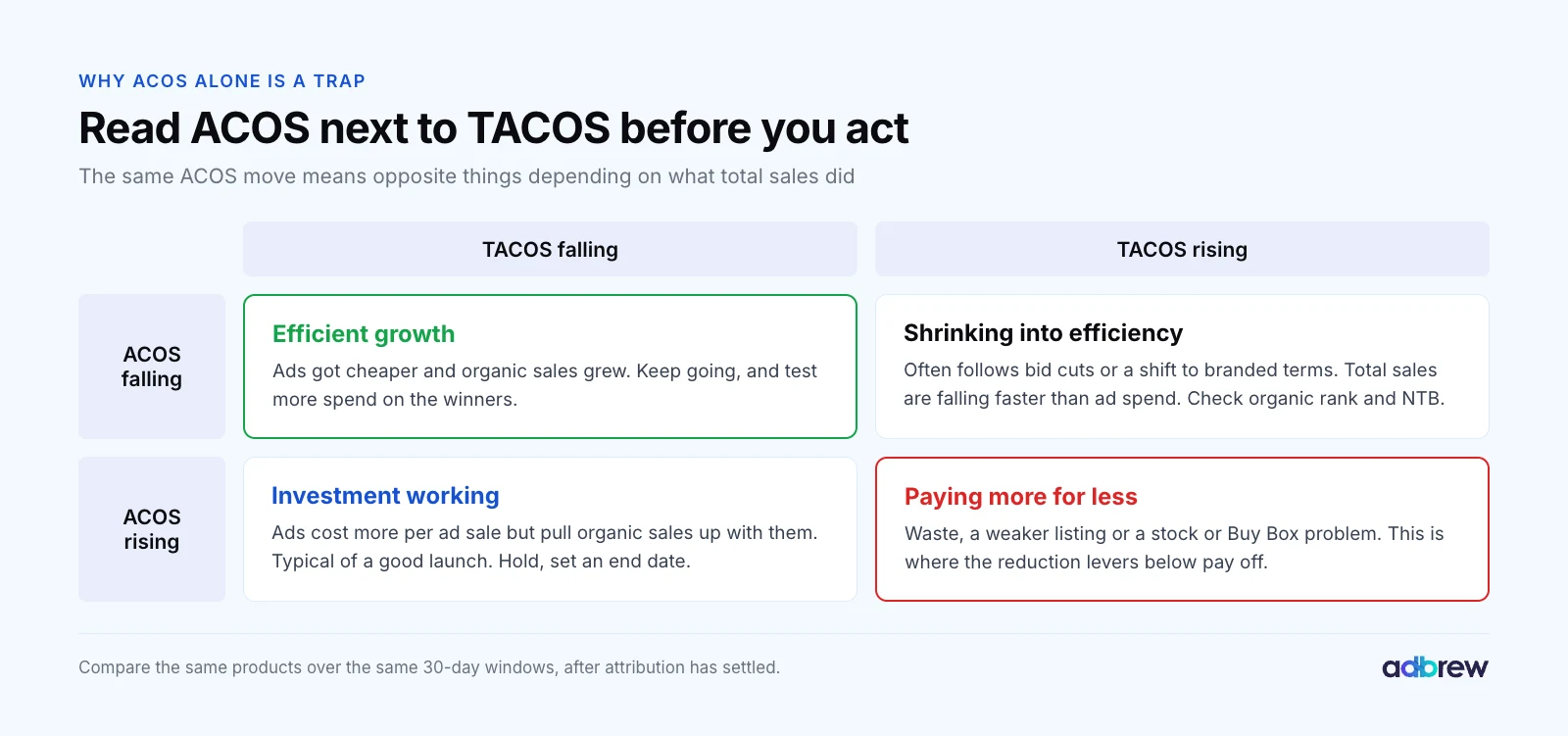
Three patterns catch most teams out:
Branded terms flatter ACOS. Shoppers searching your brand name would often have found you organically. A 6% ACOS there is not growth.
Bid cuts lower ACOS and total sales together. Fewer clicks on generic terms means less sales velocity, which can cost organic rank on the same keywords.
New customers cost more. Upper-funnel and competitor terms carry a higher ACOS, and they are where new-to-brand customers come from.
So before reducing ACOS, read it next to TACOS for the same products over the same 30 days. If ACOS rose and TACOS fell, ads are pulling organic sales up with them, which is a halo effect worth paying for. If both rose, use the levers below.
How to Reduce ACOS on Amazon: 9 Levers, Ranked
This is the order we work in when an account's ACOS is above target. The first three fix most problems within two weeks.

1. Negate Search Terms That Spend Without Selling
Wasted spend on irrelevant searches is the most common cause of high ACOS we find, and the fastest to fix.
Open the search term report for the last 60 days and sort by spend. Filter to terms with zero orders, then negate the ones that are irrelevant or have had enough clicks to prove they won't convert.
Use your conversion rate to decide how many clicks is enough. At 10%, a good term needs about 10 clicks per order, so we negate relevant terms after 20 to 30 clicks with no order. Our negative keywords guide has the full thresholds.
A worked example: an account spends $10,000 a month for $30,000 in ad sales, a 33.3% ACOS. If $1,400 of that spend sits on terms past the threshold with no orders, negating them leaves $8,600 for nearly the same sales. ACOS falls to about 28.7% without a single bid change.
For accounts with thousands of terms, n-gram analysis finds the wasteful words ("free", "used", a competitor's model number) faster than term-by-term review.
2. Bid Each Target to Its Own Target ACOS
Most accounts we audit set bids by campaign or by feel. ACOS improves quickly when each keyword and product target is bid to what its own conversion rate can afford.
Max bid = average order value × conversion rate × target ACOS
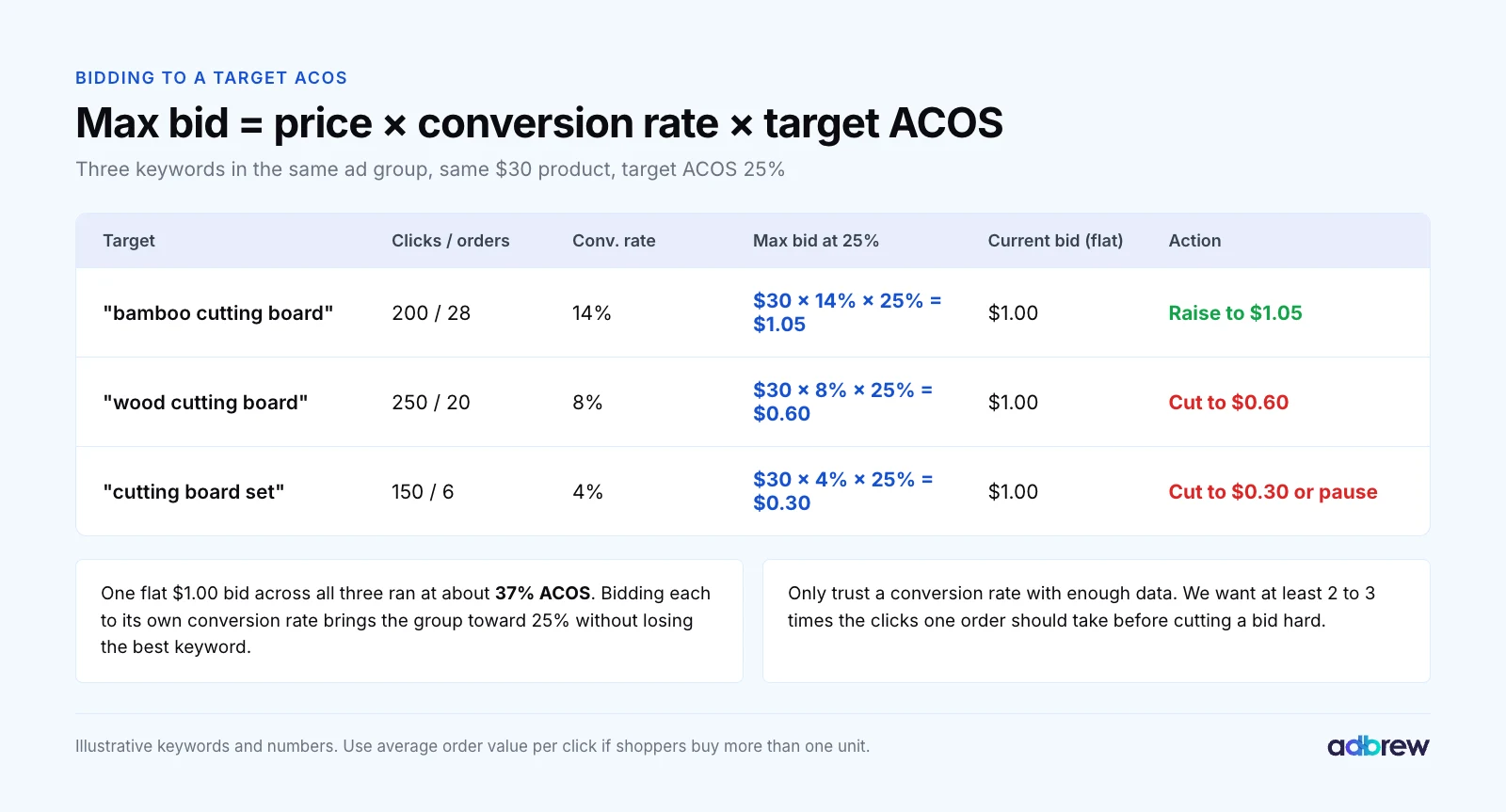
Say a $30 product has a 25% target ACOS. A keyword converting at 14% can afford $1.05 a click. One converting at 8% can afford $0.60, and one at 4% only $0.30.
A flat $1.00 bid across all three runs at about 37% ACOS. Bidding each to its own number raises the winner, trims the others and moves the group toward 25%.
Only act once a target has enough clicks to trust its conversion rate. Below that, change bids in small steps of 10% to 20%. Our bidding strategies guide covers how often to adjust.
3. Fix Placements and Your Bidding Strategy
Sponsored Products charges different prices on different placements, and they convert very differently. The placement report splits each campaign into top of search, rest of search, product pages and, increasingly, off-Amazon.
Placement (illustrative) | CPC | Conversion rate | ACOS on a $30 product |
|---|---|---|---|
Top of search | $1.50 | 16% | 31% |
Rest of search | $1.00 | 8% | 42% |
Product pages | $0.90 | 5% | 60% |
In a campaign like this, the expensive placement is the efficient one. We would raise the top of search modifier and lower the base bid, which cuts what you pay on product pages and rest of search.
Placement modifiers go up to 900%, and Amazon added a rest of search adjustment in January 2024. Our placement modifiers guide shows the setup.
Check the bidding strategy too. Under "dynamic bids, up and down", Amazon can raise or lower your bid by up to 100% based on how likely a click is to convert, according to its dynamic bidding guide. For a campaign already above target, "down only" is the safer setting.
Watch off-Amazon spend in 2026. Sponsored Products has run on third-party apps and sites since 2023. From August 10, 2026, campaigns were also enrolled by default into creator content in Amazon's Influencer Program, PPC Land reported.
Top of search and product page modifiers don't apply off Amazon. If the placement report shows off-Amazon clicks converting far below your on-Amazon rate, switch the campaign setting to "Limit off-Amazon spend".
4. Harvest Converting Search Terms Into Exact Match
Auto and broad campaigns find new search terms, but they pay discovery prices for the ones you already know convert.
When a term from auto, broad or phrase has two or more orders at or below target ACOS, add it as an exact keyword in a performance campaign. Then negate it as negative exact in the campaign it came from, so the two don't compete.
Exact match gives the term its own bid and its own data, and usually a better conversion rate. Our guides to match types and an automated keyword harvesting funnel walk through the rules.
5. Restructure the Account So Each Campaign Has One Job
High ACOS often hides in a structure where branded, generic and competitor terms share one budget and one target.
Split them. Branded campaigns run at a low ACOS, generic campaigns near break-even, and competitor campaigns at whatever ACOS your new-customer value supports. Each gets its own target, its own budget and its own report.
Keep ad groups to one product theme, so a single bid fits every keyword in them. Our campaign structure guide shows the layout we use.
6. Raise the Listing's Conversion Rate
Conversion rate sits in the denominator of ACOS, which makes it the strongest lever over time. Moving from 10% to 12% cuts ACOS by a sixth on every click you already buy.
What usually moves it, in order: the main image at phone size, price against the products shown next to yours, review count and rating, then title, bullets and A+ Content. Test one change at a time with Amazon's Manage Your Experiments.
Our conversion rate guide shows how to build your own baseline and diagnose a drop. If one child ASIN of a variation converts far better than the others, advertise that one.
7. Daypart on Hourly Data
Most accounts have hours that cost more and convert less, usually overnight and early morning. Daily reports average them away.
Amazon Marketing Stream delivers campaign data by the hour, so you can see when clicks turn into orders. Amazon's own schedule-based bid rules can raise bids at set times. Cutting bids in weak hours takes a dayparting schedule.
Dayparting rarely fixes a broken account on its own. On a clean one, it typically trims a few points of ACOS by moving spend from low-converting hours to high-converting ones.
8. Get Retail Ready Before You Bid
Ads amplify a listing. They can't fix one, and they keep spending when it breaks.
Before raising any bid, check that the ASIN holds the Buy Box, has stock for the next few weeks, has a competitive price and has a rating that survives comparison. Losing the Buy Box to a reseller or running low on stock can double ACOS overnight, with nothing wrong in the campaign.
This is why we treat retail readiness as a prerequisite rather than an optimization. It comes before every other lever in practice, even though it sits eighth in the list.
9. Advertise the Right ASINs and Raise Order Value
Some products can't hit target ACOS at any bid, because their price is too low to carry a click. A $9 item with a $1.00 CPC and 10% conversion rate runs at 111% ACOS.
For those, sell more per order instead: virtual bundles, multipacks or a higher-value variation as the advertised ASIN. Then move budget to the products whose margin can pay for the click.
When a Higher ACOS Is the Right Call
Reducing ACOS is not always the goal. We deliberately run above break-even in four situations:
Launches. A new ASIN needs sales velocity and reviews before it can rank organically. Our product launch strategy covers how long to fund it.
New-to-brand acquisition. If a first order loses $3.50 at 45% ACOS but 30% of those customers reorder twice at $10 profit each, each acquired customer is worth about +$2.50 on average.
Defending rank on a hero keyword. Losing page one costs organic sales that never show up in ACOS.
Peak events. Prime Day and Q4 traffic converts differently, and share of voice bought there carries into the weeks after.
Each of these needs a number and an end date. "We're investing in growth" with no target ACOS and no review date is how accounts drift to 60%.
What Changed in 2025 and 2026
ACOS is calculated the same way it always was. What changed is where the clicks come from and how some sales are reported.

More competition for the same clicks. Amazon's advertising revenue was $19.8 billion in Q2 2026, up 26% year over year, according to its second-quarter results. More advertisers bidding for the same searches keeps upward pressure on CPC.
Prompts on your ads. Sponsored Products and Sponsored Brands prompts became generally available in the US on March 25, 2026. Campaigns were enrolled automatically, prompt clicks are billed as normal clicks, and you can pause individual prompts.
New placements by default. Off-Amazon and creator placements, covered in lever 3, are on unless you limit them.
A new buying console. At unBoxed 2026, Amazon announced Amazon Ads Agent, which combines sponsored ads and DSP buying with natural-language reporting. It is in expanded closed beta. The metrics, and the judgement about them, stay the same.
Mistakes We See in Real Accounts
One ACOS target for the whole account. Products with different margins need different targets.
Cutting bids across the board. ACOS falls, sales and organic rank fall with it, and TACOS rises.
Judging yesterday's ACOS. Attribution takes up to 14 days to settle. Make bid decisions on 14 to 30 days of data.
Counting branded ACOS as success. Report branded and non-branded ACOS separately, or the blend hides waste.
Negating too early. Ten clicks without an order on a product that converts at 5% proves nothing.
Advertising out-of-stock or Buy Box-less ASINs. The spend keeps going even when the conversion rate collapses.
If several of these sound familiar, a full Amazon PPC audit is the right starting point.
How We Manage ACOS in Adbrew
Every lever above can be done by hand in the Amazon Ads console. On one account it takes hours a week, and across a portfolio it doesn't get done consistently.
Adbrew is an agentic retail media management platform for Amazon and Walmart, and this is how the ACOS work runs inside it:
Rulesets with your thresholds. Bid each target to its own target ACOS, negate terms past a click threshold and adjust placement modifiers, all on lookbacks and guardrails you set. Sponsored Ads management shows every rule in plain language.
Automated harvesting. Converting terms move from auto and broad into exact and are negated at the source on your rules.
Retail-aware automation. Ads pause when an ASIN goes out of stock or loses the Buy Box, and resume when it's back.
Hourly data and dayparting. Amazon Marketing Stream data powers hour-by-hour bid, budget and placement schedules.
Adbrew Intelligence. Ask for "the ten search terms with the most spend and no orders this month" or "ACOS versus TACOS by brand", and the agent builds it from your data.
Profitability puts ad spend next to fees, cost of goods and net profit, so you can judge ACOS against what the business actually kept.

Brands on Adbrew see an average 46% decrease in ACOS. Metrix cut ACOS by 31.97% in two months while sales rose 17.55%.
Bring Your ACOS Back to a Number You Chose
A good ACOS is one you set on purpose, per product, from your margin and your goal. Everything else on this page is how to get there and stay there.
Want to see target-ACOS rules, automated harvesting and hourly data on your own account? Book a demo with our team and we'll walk through your ACOS with you.
Frequently Asked Questions
What does ACOS mean on Amazon?
ACOS means advertising cost of sales. It is the share of ad-attributed sales that you spent on Amazon ads, shown as a percentage. An ACOS of 25% means you spent 25 cents on ads for every dollar of sales those ads generated.
How do you calculate ACOS?
ACOS is calculated by dividing ad spend by ad-attributed sales and multiplying by 100. If you spent $200 on ads and they drove $800 in sales, your ACOS is 200 ÷ 800 × 100 = 25%. Amazon shows ACOS for each campaign, ad group and target in the Ads console.
What is a good ACOS on Amazon?
A good ACOS on Amazon is below your break-even ACOS, which equals your profit margin before ad spend. For a product with a 33% margin, a 20% to 25% ACOS earns profit, while 33% only breaks even. Launch and new-customer campaigns can justify a higher ACOS for a set period.
Why is my Amazon ACOS so high?
Amazon ACOS is usually high for one of three reasons: you pay for clicks on irrelevant search terms, your bids are above what your conversion rate can support, or the listing converts poorly. Check the search term report first, then bids by target, then the Buy Box, stock, price and reviews.
What is the difference between ACOS and TACOS?
ACOS divides ad spend by ad-attributed sales, while TACOS divides ad spend by total sales, including organic. ACOS shows campaign efficiency. TACOS shows how much of the whole business advertising costs, and whether ads are lifting organic sales over time.
Is ROAS the same as ACOS?
ROAS (return on ad spend) is the inverse of ACOS. ROAS is ad sales divided by ad spend, so a 25% ACOS equals a 4.0 ROAS and a 50% ACOS equals a 2.0 ROAS. They measure the same efficiency, expressed as dollars returned rather than a percentage spent.
What is the difference between target ACOS and break-even ACOS?
Break-even ACOS is the highest ACOS at which an ad sale makes zero profit, equal to your margin before ad spend. Target ACOS is the level you choose to bid toward for a goal: below break-even for profit, near or above it for launches and growth.
Does lowering bids reduce ACOS?
Lowering bids usually reduces ACOS, because each click costs less, but it also reduces impressions and sales. Cut bids target by target to what each one's conversion rate can afford, rather than across the board, and watch TACOS to make sure total sales hold.