Amazon Sponsored Products & Brands AI Prompts: How to Use it?

Shivam Kumar
If you run Sponsored Products or Sponsored Brands campaigns in the US, Amazon is now charging you for a feature you were probably auto-enrolled in without noticing. It's called Sponsored Prompts, and as of March 25, 2026, the free beta is over.
Here's what changed, how it works, and what to do about it.
What Sponsored Prompts are
A Sponsored Prompt is a short question that appears alongside your ads, written in the kind of language a shopper might use when asking Rufus, Amazon's AI shopping assistant. Something like "Is this espresso machine good for small kitchens?" or "What makes this coffee different from supermarket brands?"
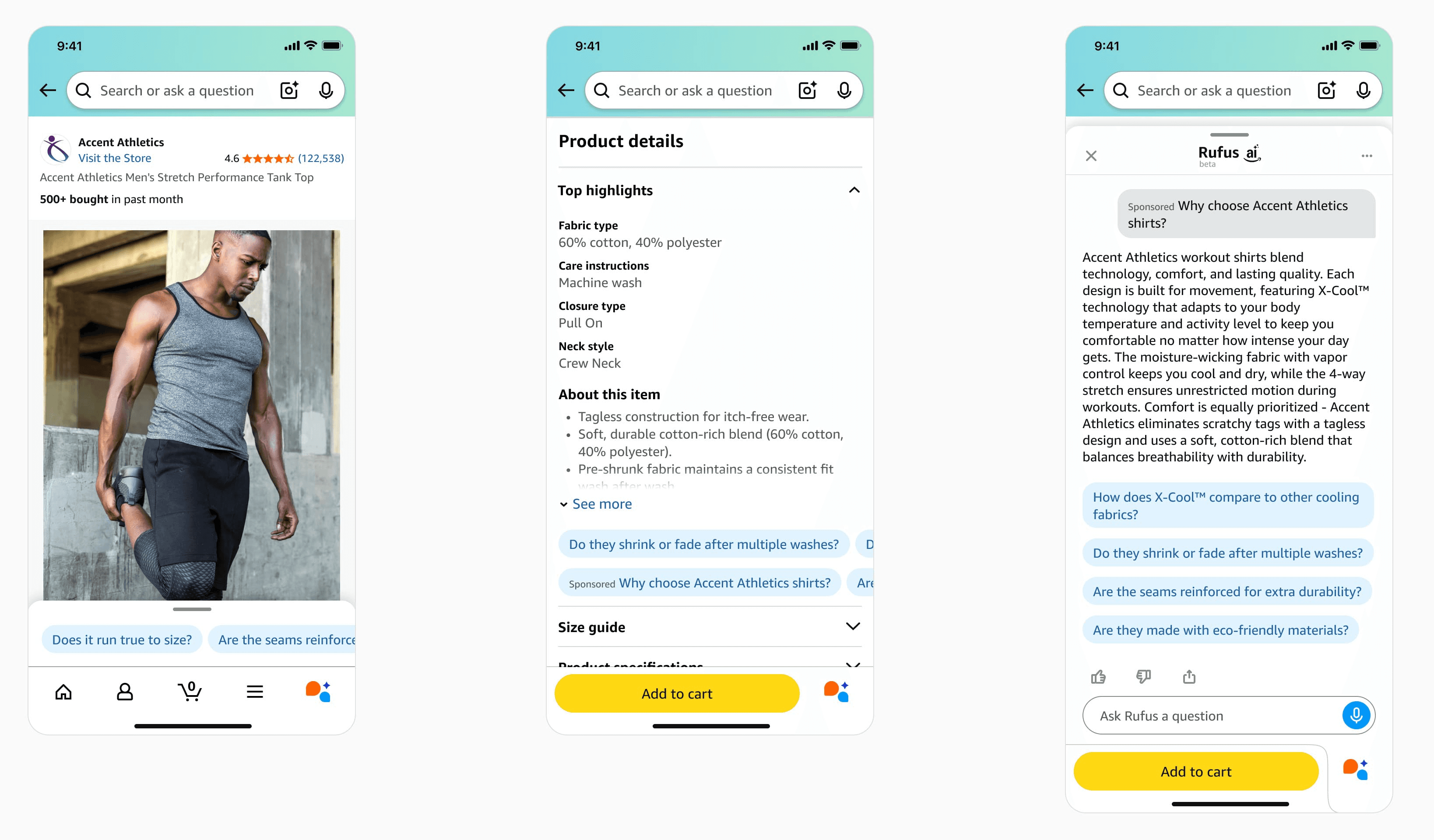
When a shopper clicks the prompt, Amazon either expands an answer on the page or opens a Rufus dialog with a generated response about your product. The answer is built from your product detail page, your A+ Content, your Brand Store, your Q&A section, and your past campaign performance.
There are two types.
Sponsored Products prompts are tied to a specific ASIN. They focus on features, use cases, or details about that one product.
Sponsored Brands prompts are broader. They speak to the brand or the category as a whole.
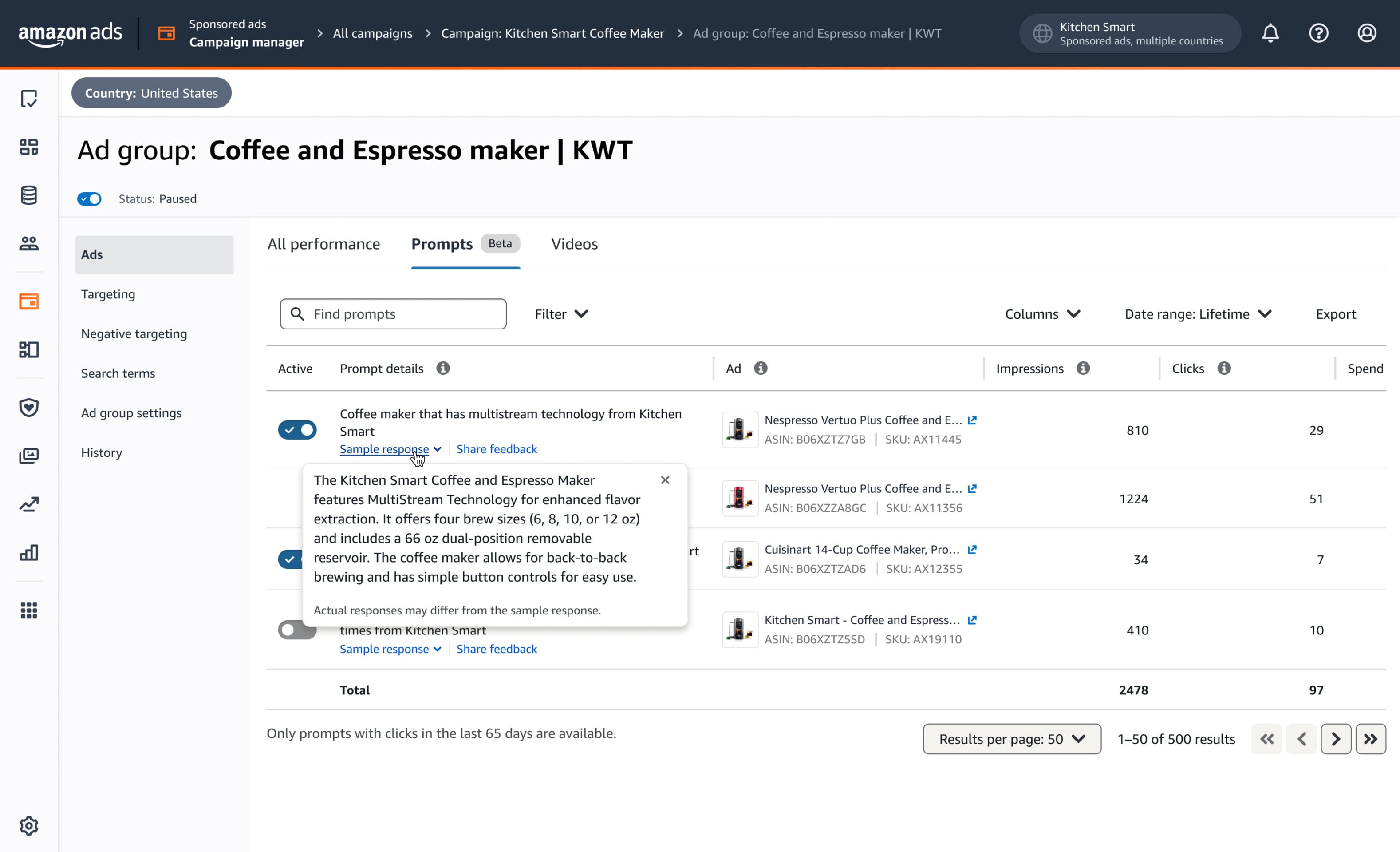
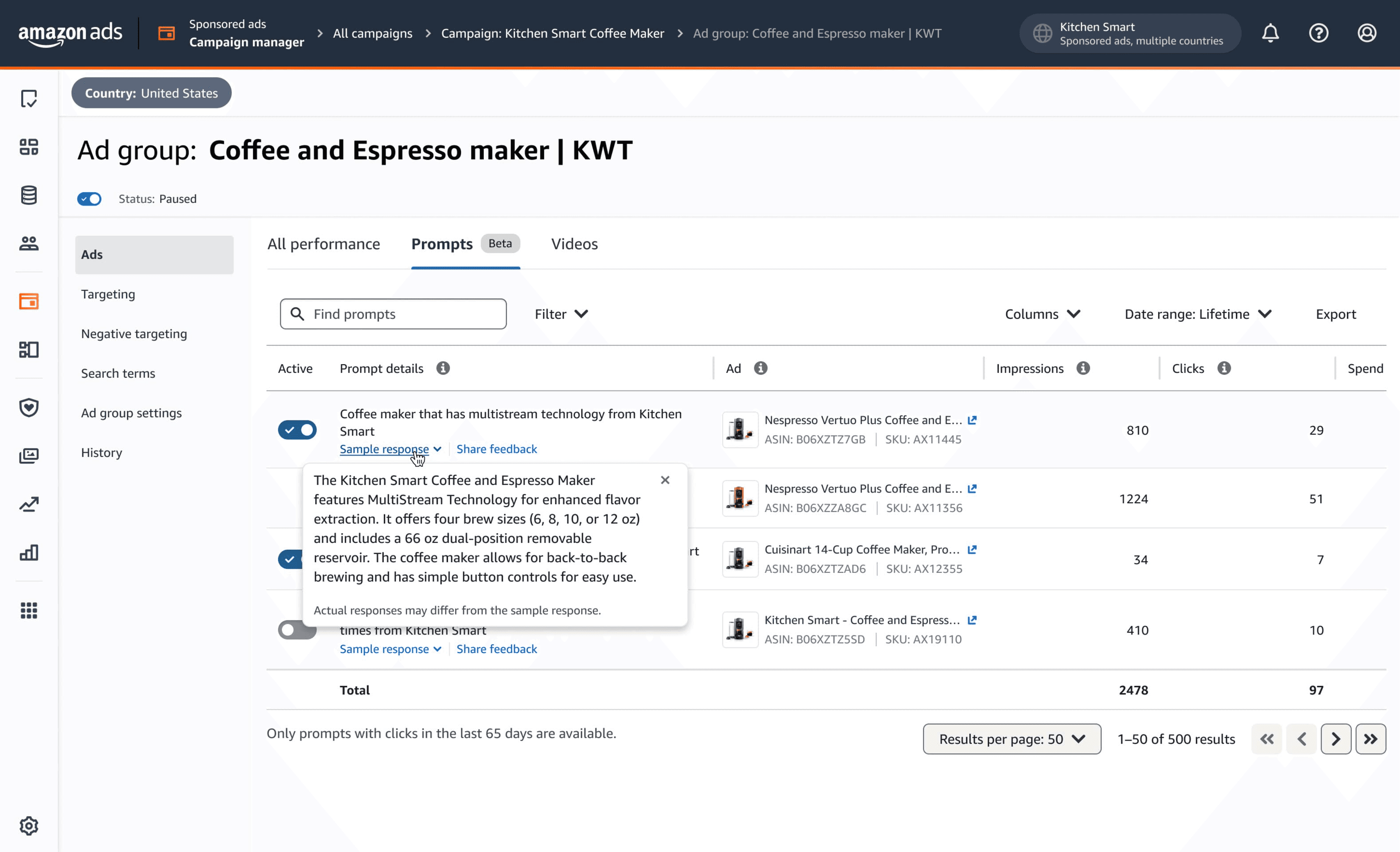
You don't write either of them. Amazon's AI does. You can review the prompts after they receive a click, see how they performed, and disable any you don't like. But you can't author them yourself, at least not yet.
What changed on March 25, 2026
Amazon announced Sponsored Prompts at unBoxed 2025 on November 11, 2025. For about four months it ran as a free open beta. Reporting went live by the end of November. Every eligible US Sponsored Products and Sponsored Brands advertiser was enrolled automatically, with the exception of authors and publishers.
On March 25, prompts entered general availability and started billing through standard CPC. There is no separate bid for prompts. They use whatever bid governs the parent campaign, with the same placement modifiers and targeting. A click on a prompt costs the same as a click on a regular ad in that campaign.
If you ignored the Prompts tab during the beta, you have no baseline data to compare against now. If you watched it during the beta, you have four months of free training data showing which prompts triggered, which ASINs got surfaced, and which questions actually converted. The brands in the second group have a real head start.
Where to find your prompts
In the Ads Console, go to Campaign, then Ad Group, then Ads, then the Prompts tab. You'll see the prompt text, the ad it's attached to, and the usual metrics like impressions, clicks, and orders.
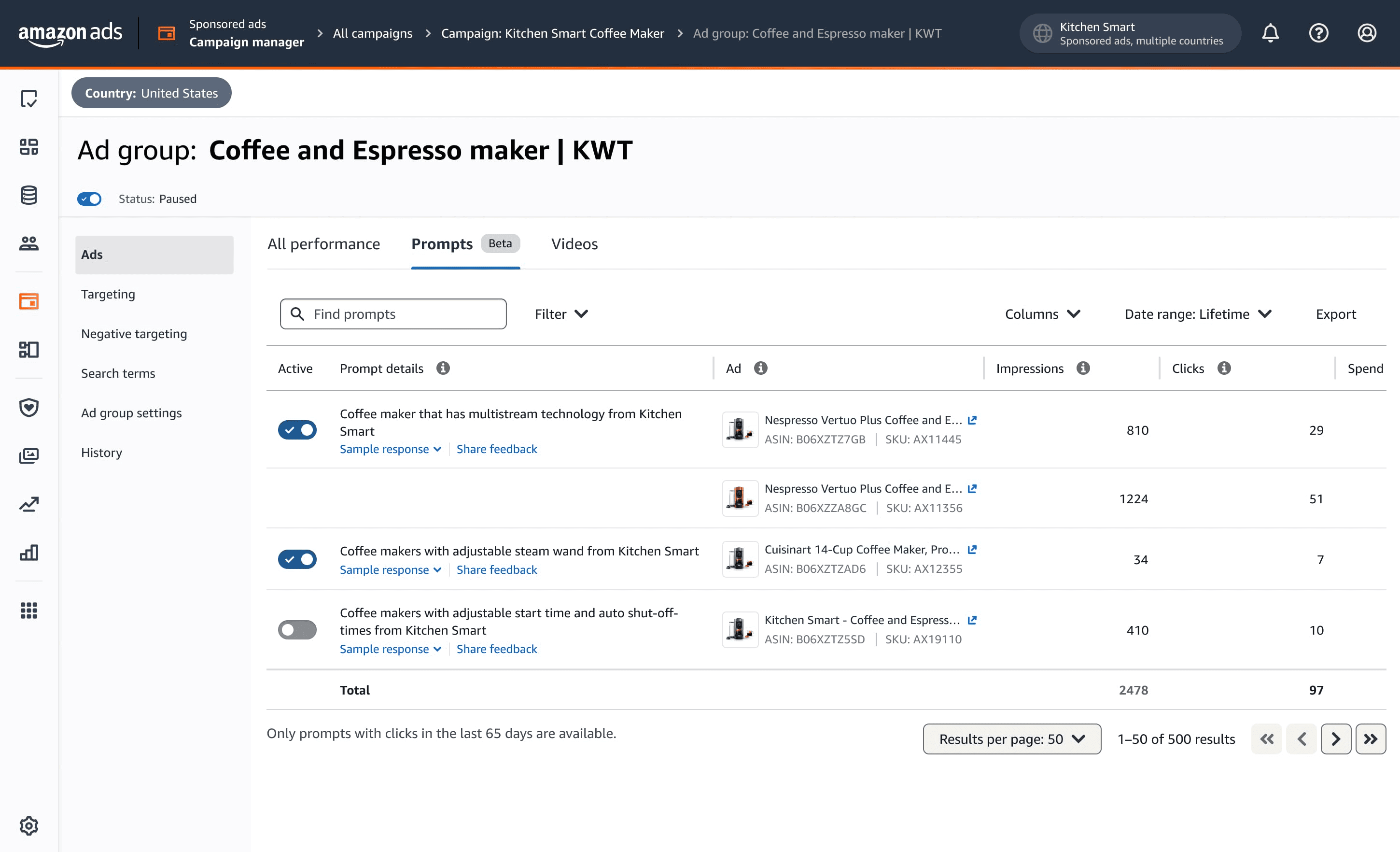
One thing to know: the tab only shows prompts that have received at least one click. If your campaign has low traffic, the tab can look empty even when prompts are serving impressions. Don't read an empty tab as proof that nothing is happening.
The same data is available through downloadable reports and the Ads API.
What Amazon's AI pulls from to generate prompts
Four sources, in roughly this order of weight.
Your product detail page. Title, bullets, description, technical specs, and the Q&A section. This is the factual base. If your bullets are vague or stuffed with disconnected keywords, the AI has thin material to work with and the prompts will reflect that.
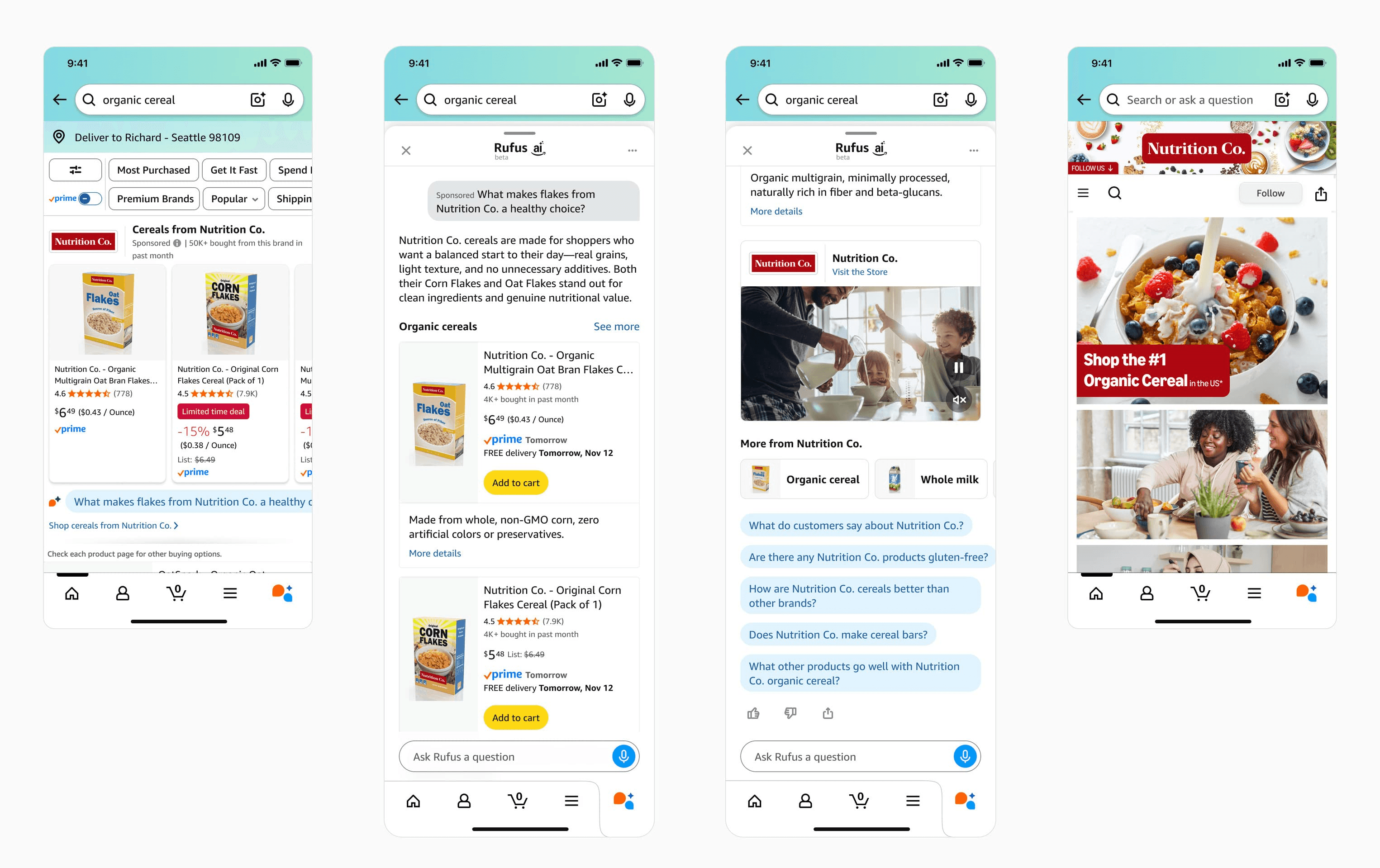
Your Brand Store. Comparison tables, category navigation, and brand messaging. This matters more for Sponsored Brands prompts than for Sponsored Products.
Your campaign performance history. The conversion patterns from your existing campaigns tell Amazon which features actually drive purchases for your products. The AI leans on those themes when generating questions.
Amazon's own shopper behavior data. Search patterns, browsing flows, and comparison behavior in your category. You can't influence this layer directly, but it's why prompts in mature, high-traffic categories tend to feel more grounded than prompts in newer ones.
The risk worth understanding
Amazon's AI is writing ad copy on your behalf, attaching it to your brand, and charging you for clicks on it. The only feedback mechanism you currently have is reactive. You can disable a prompt after the fact, but you can't pre-approve one.
That matters because AI systems sometimes oversimplify, sometimes overstate, and sometimes generate questions your product can't actually answer well. A prompt that says "waterproof" when your product is water-resistant will pull clicks from shoppers who then read a Rufus response that disappoints them. You paid for the click and the brand impression sits with you.
This is the single biggest reason to make reviewing the Prompts tab a recurring task rather than a one-time check.
What the early data is showing
A few patterns from agencies and sellers tracking prompt performance through the beta and into general availability.
Conversion rates on Rufus-mediated clicks tend to run higher than traditional search clicks. The reason is intuitive. By the time a shopper engages with a prompt, the AI has already pre-qualified their intent. Someone asking "is this water bottle suitable for hot yoga" is closer to a purchase decision than someone typing "water bottle" into the search bar.
Independent research from The Mars Agency comparing Rufus results with Amazon's page-one search has found surprisingly little overlap. Only about 22% of products ranking on page one of search also appear in Rufus results. About 36% of products Rufus recommends aren't on page one at all.
That second point is the one to sit with. Rufus is building a parallel discovery layer that runs on different signals than traditional search rank. The brands winning here aren't always the ones winning at keyword auctions.
What to do this week
A practical checklist, ordered by urgency.
Audit every active Sponsored Products and Sponsored Brands campaign with meaningful spend. Open the Prompts tab on each one. Read the prompts that have received clicks. Check the metrics on prompt-attributed activity specifically. If a prompt is converting poorly or mischaracterizing your product, disable it.
Pull out any prompts that misrepresent your product. Common cases: prompts that overstate a feature, prompts that pull a use case from a review that doesn't reflect your positioning, or prompts that compare you to competitors in a way you'd never write yourself. There's no penalty for disabling. Do it.
Use the prompts as a free PDP audit. The questions Amazon's AI is generating are, in effect, the questions Amazon believes your shoppers are asking. If a prompt asks something your PDP doesn't answer well, that's a content gap, and it's costing you in both prompts and organic Rufus visibility. Fix the bullets, the A+ Content, and the Q&A to address those questions directly.
Tighten your PDPs for semantic relevance, not just keyword density. Write titles as coherent descriptive phrases instead of comma-separated keyword strings. Structure bullets to answer how, why, and what-if questions. Make sure A+ Content has enough text for the AI to actually parse, not just image-only modules.
Broaden your keyword and target sets to include conversational, long-tail phrases. Things like "best portable espresso for camping" or "office chair for back pain under $300." These reflect how Rufus interprets shopper intent.
Set up a recurring review cadence. Weekly for high-spend accounts. Bi-weekly for most others. Treat the Prompts tab the way you treat search term reports, something you mine for negatives and positives on a regular schedule.
If you're managing dozens or hundreds of campaigns across brands or marketplaces, doing this campaign by campaign in the Ads Console will eat hours every week. Adbrew surfaces prompt-level performance across your portfolio in one view, flags prompts with poor conversion or high ACOS, and lets you action them in bulk.
Should you opt out entirely?
You can. The opt-out is per-prompt within a campaign, so you have granular control rather than an all-or-nothing decision.
Some advertisers will decide the loss of copy control isn't worth the incremental conversion lift. That's defensible, particularly in regulated categories or for brands where messaging precision matters more than reach. If you go that route, document the reasoning so it doesn't quietly get reversed at the next platform refresh.
For most brands, the more useful frame is to stay enrolled but treat the Prompts tab as a managed surface, not a passive one. Review weekly. Disable mismatches. Use the data to improve PDPs.
What's coming next
A few things worth watching.
Pricing dynamics. Prompts share CPC with their parent campaign right now. Amazon has historically introduced premium placement pricing once a beta feature matures, so auction-based bidding for top prompt placements is plausible.
Authoring controls. The biggest gap today is that advertisers can disable but can't write prompts. Amazon will likely introduce some level of customization or guardrails. Every agency and every brand we've talked to wants this.
International rollout. Prompts are US-only as of this writing. Expansion is a question of when, not if.
Attribution clarity. Amazon doesn't currently isolate Rufus placements as a distinct line in reporting. As more spend flows through AI-mediated surfaces, advertisers will push for more transparency on how those clicks perform versus traditional placements.