What is Adbrew Intelligence? Agentic AI for Amazon Ads

Shivam Kumar
Most Amazon advertisers I talk to spend a strange amount of their week doing the same five things. Pulling a report. Filtering it. Comparing two date ranges. Spotting a campaign that looks off. Then logging into another tab to actually fix it.
That's the gap Adbrew Intelligence is built to close.
It's our agentic AI layer, sitting on top of the existing Adbrew automation engine and measurement layer. You ask questions in plain English. You investigate problems. You take real actions inside your ad account. All in one chat-style interface.
This post is a behind-the-scenes look at what it does, why we chose to build it the way we did, and where I think this category is heading.
A quick context-setting on AI in advertising
The last two years have shifted how software gets used.
Chat interfaces are now better at understanding plain English than most dropdown menus. Large language models can read structured data and reason about it. Agents can take actions, not just answer questions. Protocols like MCP (Model Context Protocol) have made it possible to plug AI into real systems safely.
Amazon and Walmart advertising sit squarely in the path of all this.
The data is messy. The surface area is huge (Sponsored Products, Sponsored Brands, Sponsored Display, Sponsored TV, Amazon DSP, AMC, Walmart Sponsored). And most of the day-to-day work is repetitive analysis followed by small, mechanical adjustments.
That's the kind of work AI is actually good at. I wrote more about where AI is genuinely useful in advertising over here if you want a wider view, but the short version is this: the boring work is now automatable in a way it wasn't twelve months ago.
Why we built Adbrew Intelligence inside the platform
The obvious question, including from our own team, was: why not just expose Adbrew as an MCP server and let people query it from Claude or ChatGPT?
We'll get there. MCP and external access are on the roadmap. But shipping inside the platform first was a deliberate call.
The bottleneck in AI for advertising right now isn't the model. It's the data plumbing.
When an agent lives inside the platform, it sees everything. Your campaign structure, your labels, your rulesets, your dayparting strategies, your Share of Voice tracking, your change history. It can reason across all of that in one pass.
A standalone tool would have to ask you for context every time. Or worse, guess.
The other reason is that an in-platform agent can actually do things. Launch campaigns. Build dashboards. Apply rules. The loop closes. You don't end up with a chatbot that gives you a beautiful answer and then asks you to go do the work yourself.
The three layers, and why they exist
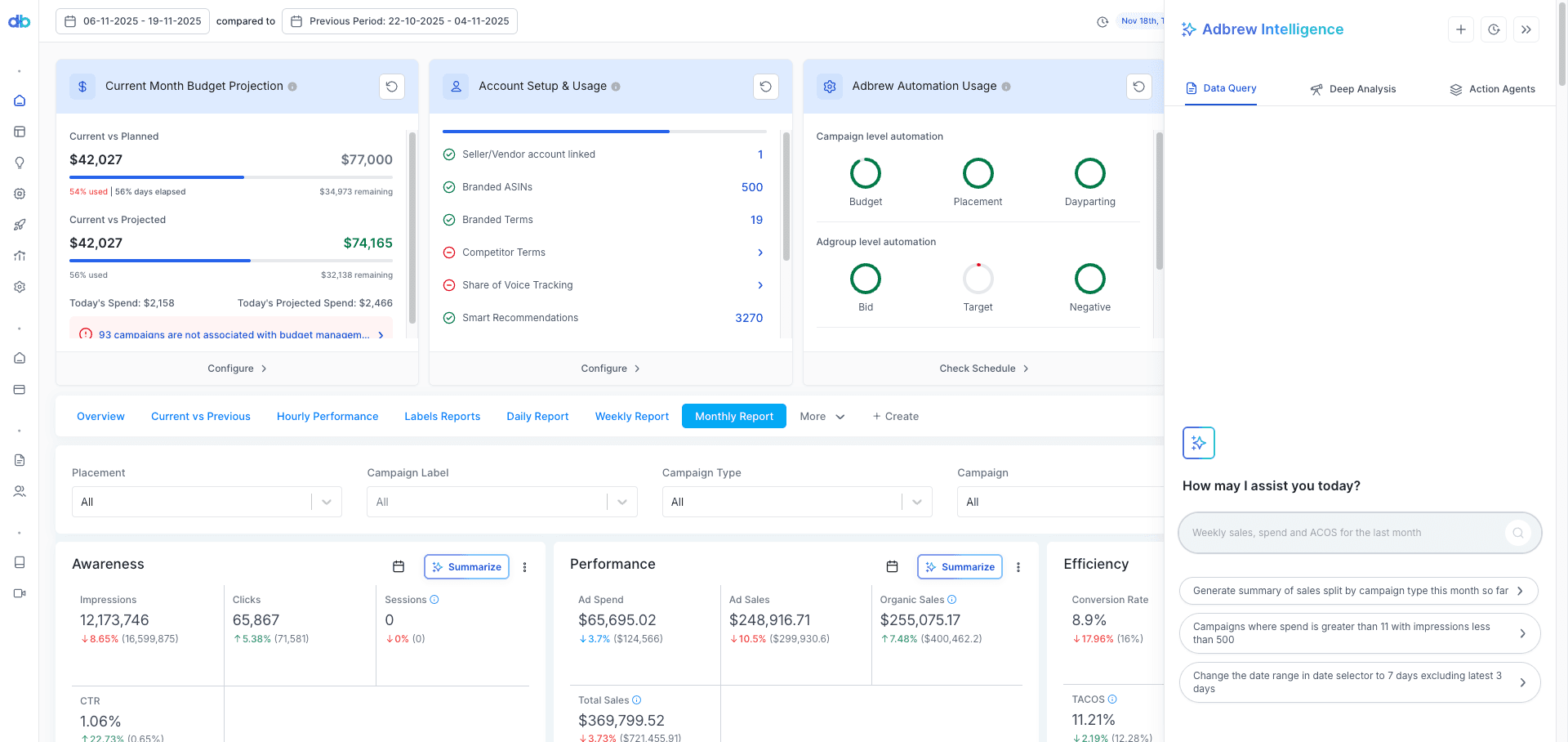
Adbrew Intelligence has three pillars. The split isn't arbitrary. It maps to the three kinds of work advertisers actually do.
The first is lookup. You just want to know something. What's spending too much. Which campaigns dropped in sales. Where ACOS spiked.
The second is investigation. Something looks off and you need to figure out why. This is the work that usually involves pulling four reports and stitching them together in a spreadsheet.
The third is execution. You've decided what needs to happen. Now someone needs to actually do it.
Each layer is a different agent.
1. Data Query
This is the fastest way to get an answer out of your account without doing the click-filter-export dance.
You ask. It responds.
A few examples of what you can ask:
"Show me campaigns with high spend and low impressions."
"Show my campaign type mix performance for the last 30 days."
"Show me all search terms with more than 50% ACOS sorted by spend."
The agent navigates to the right Adbrew page, applies the filters, adjusts the date range if needed, pulls the chart, and shows a quick summary in a pop-up.
Data Query is built for the moments where you just want to look something up. Not investigate. Not optimize. Just see the number.
It sounds small. In practice, it's the feature people use the most, because most of advertising operations is lookup.
2. Deep Analysis Agent
This is where Adbrew Intelligence starts replacing actual hours of work.
The Deep Analysis Agent is built to help you understand why something happened.
Why did sales drop last month Why is ACOS suddenly climbing on this campaign. What changed inside this ad group that pulled performance down.
The traditional way to answer questions like that is painful. You download multiple reports. You check the change log. You compare time periods side by side. You cross-reference target performance, search term shifts, bid changes, product-level data. Then you piece it all together in a sheet, hoping the pattern shows up.
The Deep Analysis Agent does all of that in parallel.
It looks at campaign performance, product-level data, target and keyword data, change history, and trend comparisons at the same time, then gives you a high-level explanation of what happened.
What I find more useful than the first answer is the follow-up loop.
You can start with "Why did my sales drop last month compared to the previous period?" The agent surfaces the campaigns most responsible for the drop. Then you can ask "What changed inside this campaign that led to the drop?" and it goes deeper. Specific targets losing sales. An 85% drop on one keyword. A recommended action.
There's also a Context button that lets you restrict the analysis to a specific campaign, a set of labels, or specific products. Useful when you want a focused investigation rather than an account-wide one.
One thing worth flagging: context can only be set at the start of the chat. Set it before you start asking, not midway through.
3. Action Agents
This is where it stops feeling like a chatbot and starts feeling like a teammate.
Action Agents don't just analyze. They make changes inside your account.
There are three of them today. More are coming.
3.1 Dayparting Agent
Dayparting is one of the highest-leverage levers on Amazon Ads.
It's also one of the most tedious to set up manually. You have to pull hourly performance data, find your best and worst hours, decide on a bid or budget or placement strategy, and configure all of it.
The Dayparting Agent collapses that into a chat.
You can say "Analyze my hourly performance from the last 60 days and identify my highest-performing hours." It pulls Amazon Marketing Stream data, surfaces your best ROAS hours, your highest sales hours, and where you're probably wasting spend.
Then you can ask it to create a strategy. You pick from bid-based, placement-based, or budget-based dayparting. The agent builds it. You preview it. You click Create.
What used to be a multi-hour exercise in Excel is now a five-minute conversation.
3.2 Campaign Launcher Agent
Bulk campaign launches are one of the most spreadsheet-heavy parts of Amazon advertising.
You build a strategy template, configure a campaign structure, decide on initial bids and budgets, then either bulk-upload through Amazon or click through campaign creation one ASIN at a time.
The Campaign Launcher Agent lets you launch campaigns directly through chat.
You say "Launch auto campaigns segmented by product for these two ASINs." The agent confirms the campaign count, analyzes your account data to calculate initial bids, budgets, and target ACOS, and builds the full structure.
This is most useful for new product launches, fast campaign setup, and avoiding the back-and-forth between sheets and the platform.
If you've ever launched 50 campaigns for a new catalog, you know the time this saves. The brands using Campaign Launcher today are mostly running large, structured account architectures where every new product needs a predictable set of campaigns spun up around it. Some examples are documented in our K2 Health case study, where 122 campaigns were launched in eight months.
3.3 Dashboard Agent
Building dashboards used to mean picking widgets, configuring metrics, choosing date ranges, arranging the layout, then writing summary commentary yourself.
The Dashboard Agent does it through chat.
You can say "Create an executive summary dashboard for last month." The agent suggests widgets, asks if you want a text summary, and builds the dashboard in one shot. You can also update existing dashboards, add new widgets, or drop in text blocks the same way.
For agencies, this matters more than it first seems. Client reporting is often the most time-consuming part of the week. Build the dashboard once with the agent, share it, refresh it monthly with a single prompt.
3.4 AMC Agent
Amazon Marketing Cloud is one of the most valuable data sources in Amazon advertising and one of the hardest to actually use. Most teams either don't touch it or pay an analyst to write SQL queries against it.
The AMC Agent makes AMC conversational.
What makes it different from the other agents is multi-report context. You can pull in several AMC reports into the same chat, the new-to-brand report, the path-to-conversion report, an audience overlap report, and ask the agent to reason across all of them at once.
That last part is the unlock. The whole point of AMC is cross-report insight. Looking at any single report in isolation rarely tells you what to do. Combining a path-to-conversion report with a new-to-brand report tells you which touchpoints are actually bringing in new customers, not just clicks. The AMC Agent lets you ask those questions in plain English instead of writing the SQL or hiring someone who can.
A few prompts that work well:
"Compare new-to-brand performance across these three reports and tell me where my best NTB sales are coming from."
"Using the path-to-conversion report and the audience overlap report, which DSP campaigns are assisting Sponsored Products conversions?"
"What's the average time-to-purchase for customers exposed to both Sponsored and DSP, based on these reports?"
This is the agent that gets the most enthusiastic feedback from agencies, because AMC analysis is where they were spending the most expensive hours.
Context: the unsexy feature that makes everything actually work
This is one of the most underrated parts of Adbrew Intelligence, and worth understanding.
Every account has quirks. Naming conventions. Stockout history. Business events. Campaign labels that mean something specific to your team. If an AI agent doesn't know these, its analysis is generic at best and wrong at worst.
That's why we built Context.
You can set it in two ways.
Chat-level context, where you tell the agent to focus on a specific campaign, label, or product before you start asking. Useful for focused investigations.
Account-level context, which applies automatically across the agents you choose. You'll find it under Settings → Add to Intelligence → Account Context.
A couple of examples of how this gets used in practice.
If your team follows a strict campaign naming convention, you can define it once at the account level. Something like "All new campaigns must start with the prefix Q4_IN_ followed by product name." The Campaign Launcher Agent applies the rule automatically every time it creates a campaign.
If your top product went out of stock in Q4 and tanked your numbers, you can add that as context. Later, when the Deep Analysis Agent investigates a Q4 performance drop, it factors in the stockout instead of telling you your ads underperformed.
You can set context per agent, per account if you manage multiple, and with optional date ranges if the context is time-bound.
Agents are only as good as the context they have. This is the feature that turns Adbrew Intelligence from a generic assistant into one that already knows your business.
How the agents work together in practice
The real leverage shows up when you use the agents in sequence.
Task | Traditional Way | With Adbrew Intelligence |
|---|---|---|
Check performance | Navigate multiple pages | Ask one question |
Investigate issues | Download reports, compare periods | Use the Deep Analysis Agent |
Adjust bids by hour | Manual sheet work | Dayparting Agent |
Launch campaigns | Build strategies and templates | Describe what you need |
Create dashboards | Add widgets manually | Dashboard Agent |
Cross-report AMC analysis | Write SQL, stitch reports | AMC Agent |
Here's what a typical session looks like.
You notice TACOS climbing. You open Adbrew Intelligence and ask the Deep Analysis Agent why. It tells you one campaign is the main contributor and that a specific target is leaking spend.
You then ask the Dayparting Agent to look at hourly performance on that campaign and propose a bid-based dayparting strategy for off-hours. You preview it. You create it.
Then you ask the Dashboard Agent to add a widget tracking that campaign's TACOS to your weekly executive dashboard.
That entire flow used to take a couple of hours across multiple tools and spreadsheets. It now takes about ten minutes.
Where I think this category is going
A prediction, half from working on this product and half from watching the wider AI market.
Most ad platforms over the next two years will look less like dashboards and more like workspaces with agents in them.
The dashboard isn't going away. It's still the right surface for browsing and visual checks. But the primary way you interact with your ad account is going to shift toward describing what you want, and having the system do it.
That has implications for how teams are structured. The work that gets automated isn't strategy, it's execution. Which means the highest-value skill stops being "I know how to operate this tool" and becomes "I know what to ask, and I can tell when the answer is wrong."
This is the part I'm watching most closely as we ship more agents. The teams getting the most out of Adbrew Intelligence today are the ones where someone senior is asking sharp questions and treating the agent like a junior teammate they trust but verify. The teams getting the least are the ones still relying on it like a search bar.