Amazon Reversed Reimbursements: All You Need to Know in 2026

Nishant Singh

Amazon reimbursements often feel like a win at first. Weeks or months later, some sellers discover that a previously approved reimbursement has been reversed and the funds are removed from their account.
These reversals usually happen after inventory status updates or internal audits, and they can affect cash flow if they go unnoticed.
In this guide, we will explain why Amazon reverses reimbursements and what sellers can do to track and respond to them effectively.
Key Takeaways:
Amazon reversed reimbursements occur when Amazon takes back a reimbursement after updating inventory records.
This usually happens when previously marked lost or damaged inventory is later found or reclassified.
Reversals can occur weeks or months after the original reimbursement and may impact cash flow if not tracked.
Regularly monitoring reimbursements and inventory reports helps sellers spot and review reversals early.
What Are Amazon Reversed Reimbursements?
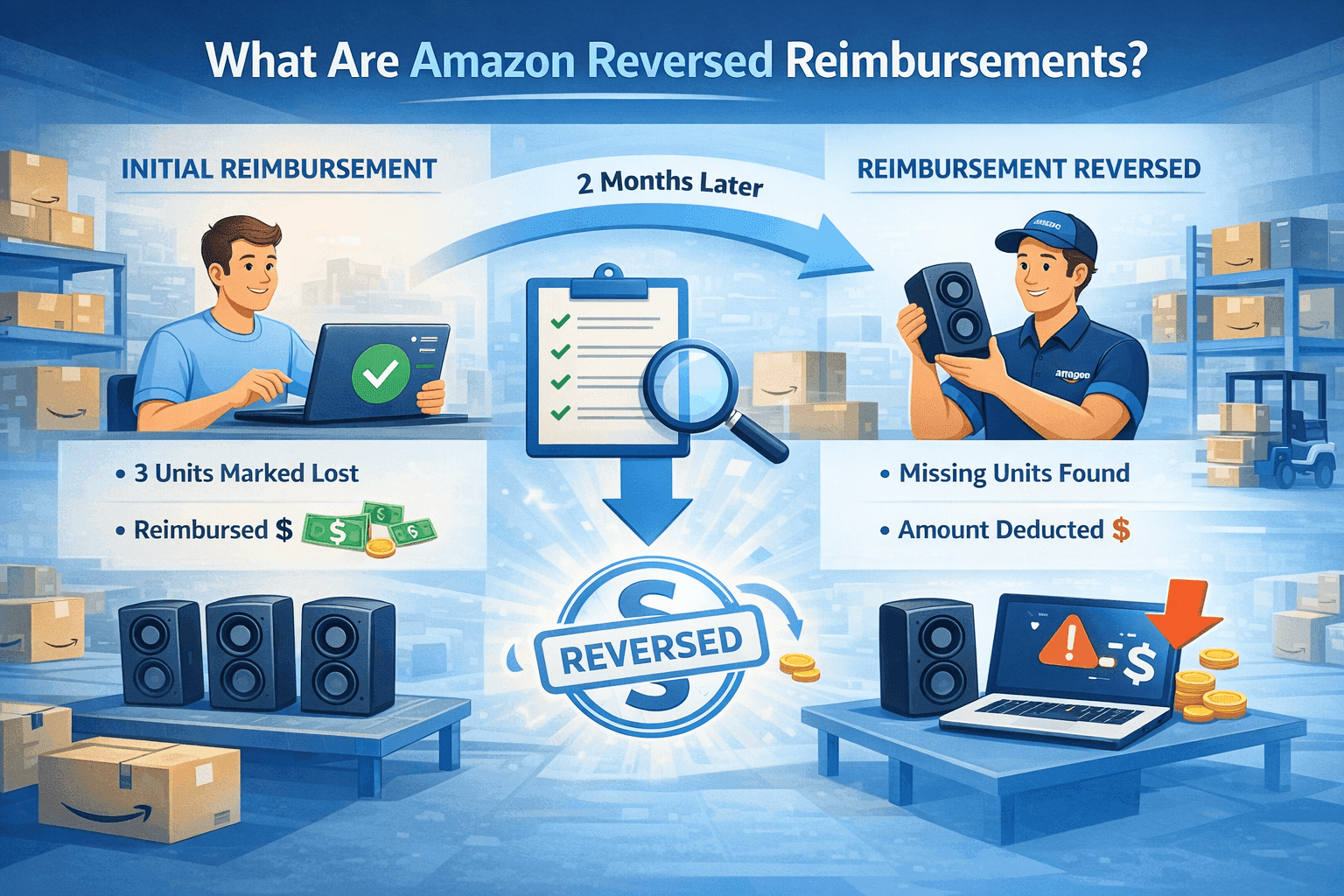
Amazon reversed reimbursements happen when Amazon removes a reimbursement that was previously credited to your seller account for inventory marked as lost, damaged, or not returned. These reversals usually occur after Amazon updates its inventory records through recounts, late scans, or internal audits.
Example:
Imagine you sell a Bluetooth speaker under SKU BT-SPK-01. You send 200 units to Amazon FBA. After several weeks, Amazon marks 3 units as lost in the fulfillment center and issues you a reimbursement for those units.
Two months later, Amazon completes a warehouse recount and finds the missing Bluetooth speakers in a different storage location. Since the units are no longer considered lost, Amazon reverses the reimbursement and deducts the amount from your seller account balance.
This process is part of Amazon’s inventory reconciliation system and is covered under its FBA reimbursement policy. While many reversals are valid, they can be confusing because they often happen long after the original reimbursement and with limited explanation.
For sellers managing multiple products and high order volumes, reversed reimbursements can quietly impact cash flow if they are not tracked regularly. Understanding how these reversals work helps sellers identify when a reversal makes sense and when it may require follow-up.
How Reversals Differ from Denied Reimbursement Requests
Amazon reversed reimbursements and denied reimbursement requests often get confused, but they happen at very different stages of the process.
Reversed Reimbursements
A reversal happens after Amazon has already paid you.
This means Amazon initially accepted that an issue occurred and issued a reimbursement. Later, new information caused Amazon to change that decision and take the money back.
Example:
You sell a phone charger under SKU CHG-USB-01. Amazon reimburses you for 2 units marked as lost in the fulfillment center.
Six weeks later, those chargers are found during a warehouse audit. Amazon then reverses the reimbursement and deducts the amount from your account.
Denied Reimbursement Requests
A denial happens before any money is paid.
In this case, you submit a reimbursement request, but Amazon decides you are not eligible based on its policies or available data.
Example:
You request reimbursement for a returned jacket under SKU JKT-BLK-02, claiming it was damaged. Amazon reviews the case and determines the item was returned in sellable condition. The reimbursement request is denied, and no credit is issued.
How Long After a Reimbursement Can Amazon Reverse It?
Amazon can reverse a reimbursement weeks or even months after it was originally issued. There is no fixed number of days after which a reimbursement becomes final.
In most cases, reversals happen within 30 to 90 days, once Amazon completes inventory recounts, return processing, or internal audits. However, some sellers report reversals occurring several months later, especially for items tied to long-term storage, customer returns, or delayed warehouse scans.

Why Amazon Reverses Reimbursements
Amazon reverses reimbursements when new information changes the outcome of an earlier decision. In most cases, the reversal is triggered by updates in inventory status, return processing, or internal audits.
Below are the most common reasons reversals happen.
1. Inventory Is Found After Being Marked Lost
This is the most frequent reason for a reversal. Amazon may initially reimburse you for inventory marked as lost in a fulfillment center. Later, during a recount or relocation scan, the missing units are found.
Example: You are reimbursed for 2 lost phone cases. A later warehouse scan locates those units in a different bin, and Amazon reverses the reimbursement.
2. Returned Items Are Reclassified
Returns are sometimes processed in stages. Amazon may reimburse you for a customer return marked as damaged or missing. If the item is later inspected and deemed sellable, the reimbursement can be reversed.
This commonly happens with apparel, electronics, and household items.
3. Late or Delayed Warehouse Scans
Inventory movement inside fulfillment centers does not always update in real time. Late scans can temporarily mark units as lost or unaccounted for. Once those scans are completed, Amazon may reverse earlier reimbursements.
4. Inventory Recounts or Audits
Amazon regularly performs inventory audits and recounts. These reviews can uncover discrepancies between recorded and physical inventory, leading to reimbursement reversals if previously “missing” items are confirmed present.
5. Reimbursements Issued in Error
In some cases, reimbursements are issued incorrectly due to system or data issues. When Amazon identifies the error, the reimbursement is reversed regardless of how much time has passed.
6. Policy or Eligibility Updates
Occasionally, Amazon may reverse a reimbursement if it determines that the original case did not meet reimbursement eligibility under current policies, especially when additional evidence becomes available.
Read More
Explore related Amazon FBA topics with these Adbrew.io resources for deeper insights into reimbursements and inventory management:
Amazon Inventory Management Tips – Strategies to prevent losses that lead to reimbursements and reversals.
Amazon FBA vs FBM – Compare fulfillment models and understand FBA-specific reimbursement risks.
Understanding Amazon Reserved Inventory – Learn how inventory status changes trigger reversals.
Amazon Business Reports – Track payments and adjustments to spot reversed reimbursements early.
How to Use the Amazon FBA Calculator – Calculate costs accurately to validate reimbursement claims.
How to Identify Reversed Reimbursements
Amazon does not always clearly flag when a reimbursement has been reversed. In most cases, sellers only notice reversals after reviewing reports or seeing unexpected balance changes. Knowing where and how to look is essential.
1. Check the Payments Report Regularly
The easiest way to spot a reversed reimbursement is in your Payments Report.
A reversal usually appears as:
A negative transaction
A description referencing a previous reimbursement
A deduction matching the original reimbursement amount
These entries often show up weeks or months after the original credit, which is why they are easy to miss.
2. Compare Reimbursement and Inventory Dates
Reversals often follow an inventory status update.
If you see:
A reimbursement issued for lost or damaged inventory
Followed later by an inventory adjustment showing units found or reclassified
There’s a strong chance the reimbursement was reversed. Matching these dates helps confirm whether the reversal aligns with an actual inventory change.
3. Review Inventory Adjustment Reports
Inventory Adjustment Reports can reveal what triggered the reversal.
Look for:
“Found” or “Recovered” inventory entries
Quantity changes that match the reversed reimbursement
Adjustments dated after the original reimbursement
These clues often explain why Amazon reversed the credit.
4. Watch for Unexpected Balance Drops
If your account balance decreases without a clear reason, a reversed reimbursement may be the cause. This is especially common for sellers with high order volume where individual reversals blend into overall payouts.
Regular reconciliation helps catch these issues before they affect cash flow planning.
Using Third-Party Tools for Tracking Reversals
Manually tracking reimbursements can become difficult as order volume grows. This is where third-party reimbursement and analytics tools can help by automatically monitoring reimbursement activity and flagging reversals.
Tools like RefundsManager and SellerLegend track reimbursements over time, match reversals to original cases, and surface discrepancies that are easy to miss in Seller Central reports. Many of these tools also store documentation and help sellers identify which reversals may be worth reviewing or disputing.
Step-by-Step Process to Dispute Reversed Reimbursements
Not every reversed reimbursement is incorrect, but some are worth disputing. The key is knowing when a reversal does not align with inventory reality and following a structured process to challenge it.
Step 1: Confirm the Reversal Is Actually Incorrect
Before opening a case, verify that the reversal does not make sense.
Check:
The original reimbursement reason (lost, damaged, not returned)
Whether the inventory was actually found or reclassified
Inventory Adjustment Reports for “found” or “recovered” entries
Return reports if the reversal is tied to a customer return
If the inventory was genuinely recovered, the reversal is usually valid. If not, it may be worth disputing.
Step 2: Gather Supporting Evidence
Amazon is more likely to review disputes that include clear documentation.
Collect:
Original reimbursement ID and date
SKU and quantity affected
Screenshots or exports from inventory reports
Any related case IDs or return status records
Having this ready avoids back-and-forth and speeds up review.
Step 3: Open a Case in Amazon Seller Central
Go to Help → Get support → Selling on Amazon → Fulfillment by Amazon → Reimbursements and open a new case.
Clearly state:
That a reimbursement was reversed
Why the reversal appears incorrect
What evidence supports your claim
Keep the explanation simple and factual.
Step 4: Reference the Original Reimbursement
Always reference the original reimbursement ID, not just the reversal transaction.
This helps Amazon’s support team:
Trace the case history
Understand the original decision
Verify whether new information actually justifies the reversal
Missing this step often leads to generic responses or denial.
Step 5: Respond Promptly to Follow-Ups
Amazon may request:
Additional screenshots
Confirmation of inventory counts
Clarification on return or shipment details
Responding quickly and clearly improves your chances of resolution.
Step 6: Escalate If Needed
If the response does not address your evidence, reply within the same case and politely request a deeper review. Avoid opening multiple cases for the same issue, as this can slow things down.
Escalation works best when:
Your documentation is complete
Inventory reports clearly contradict the reversal
Communication remains professional and concise
Step 7: Track the Outcome
Once resolved, update your records to reflect:
Whether the reimbursement was reinstated
Any notes from Amazon’s decision
Changes to inventory status
This helps you spot patterns and improves future dispute success.
Conclusion
Amazon reversed reimbursements are a normal part of how Amazon reconciles inventory, but that doesn’t mean sellers should ignore them. Because reversals often happen weeks or months after the original reimbursement, they can quietly affect cash flow if they are not tracked and reviewed.
The key is understanding the difference between valid reversals and cases that deserve follow-up. By regularly reviewing reports, tracking reimbursement history, and documenting inventory changes, sellers can stay in control instead of reacting to unexpected balance adjustments.
For larger sellers, third-party tools can help automate tracking and surface issues faster. For smaller sellers, a consistent manual review process may be enough. What matters most is having a system in place, not the size of your operation.
Reversed reimbursements are not always mistakes, but they should never be a surprise. Sellers who treat reimbursement tracking as an ongoing process are better positioned to protect margins, maintain accurate records, and run a more predictable Amazon FBA business.
Frequently Asked Questions About Amazon Reversed Reimbursements
Why does Amazon reverse reimbursements to sellers?
Amazon reverses reimbursements for several reasons:
Inventory previously reported as lost is found in their fulfillment centers
Duplicate reimbursement claims were processed
Investigation reveals the original claim was inaccurate
Customer returns items that were initially reimbursed as lost
These reversals help Amazon maintain accurate inventory tracking and prevent overpayment to sellers.
How can sellers identify reversed reimbursements in their account?
Sellers can identify reversed reimbursements by checking their payment reports in Seller Central. Look for negative amounts in the "FBA Inventory Reimbursement" section or transactions labeled as "Reversal" or "Chargeback." These will appear as deductions from your account balance and may reference the original reimbursement transaction ID.
Can sellers dispute Amazon's reversed reimbursements?
Yes, sellers can dispute reversed reimbursements if they believe the reversal was made in error. Open a case through Seller Central's "Contact Us" section, provide the transaction details, and explain why you believe the reversal is incorrect. Include any supporting documentation such as photos, shipping records, or previous correspondence with Amazon support.
How do reversed reimbursements affect seller account health?
Reversed reimbursements typically do not directly impact your seller performance metrics or account health. However, frequent reversals might indicate inventory management issues or incorrect claims filing. Maintaining accurate records and only filing legitimate reimbursement claims helps avoid potential account scrutiny and ensures smooth operations.
What should sellers do to prevent reimbursement reversals?
To minimize reimbursement reversals, sellers should:
Wait adequate time before filing lost inventory claims (typically 30+ days)
Maintain detailed inventory records and shipping documentation
Avoid filing duplicate claims for the same items
Regularly reconcile inventory reports with actual stock levels
Proper documentation and patience reduce the likelihood of premature or incorrect reimbursement requests as discussed in industry best practices.
How long does Amazon take to process reversed reimbursements?
Amazon typically processes reversed reimbursements within 24-48 hours of identifying the error. However, the investigation period that leads to the reversal can take several weeks or months. Sellers are usually notified through email or Seller Central notifications when a reversal occurs, though some may only notice through payment report changes.
Are there fees associated with Amazon reversed reimbursements?
Amazon generally does not charge additional fees for processing reversed reimbursements beyond recovering the original amount. However, if reversals become frequent due to seller error or abuse, Amazon may take enforcement actions including account restrictions. The primary cost to sellers is the loss of funds they had previously received and potentially counted as revenue.