How to Run Prime Video Ads with Amazon DSP [5 Steps]

Shivam Kumar
Prime Video is now one of the largest ad-supported streaming services on the planet, and for the first time you can buy it self-serve inside Amazon DSP instead of routing every campaign through an Amazon rep.
This guide walks through the full workflow: the buy types you can choose from, how to build the deal, set up the order, attach it to a line item, and launch without the mistakes that quietly kill delivery.
TL;DR
Prime Video ads are bought through Amazon DSP, not the Sponsored Ads console. There is no separate "Prime Video Campaign Manager."
In the US, Prime Video, Prime Video "watch for free" (formerly Freevee), and Twitch now run on Programmatic Guaranteed (PG) and Private Auction (PA) deals only. Preferred Deals were retired for these in the US as of 29 Sep 2025.
The flow is always the same three parts: 1) create the deal proposal in Inventory Hub, 2) create the order in Campaign Manager, 3) create a line item and attach the deal.
Pick PG when you need guaranteed delivery at a fixed CPM. Pick PA when you want lower, dynamic pricing and are fine giving up the delivery guarantee.
Creative is full-screen, non-skippable video: MP4, 16:9, minimum 1920x1080, minimum 15 Mbps bitrate. Upload assets at least 48 hours before your start date.
What are Prime Video ads?
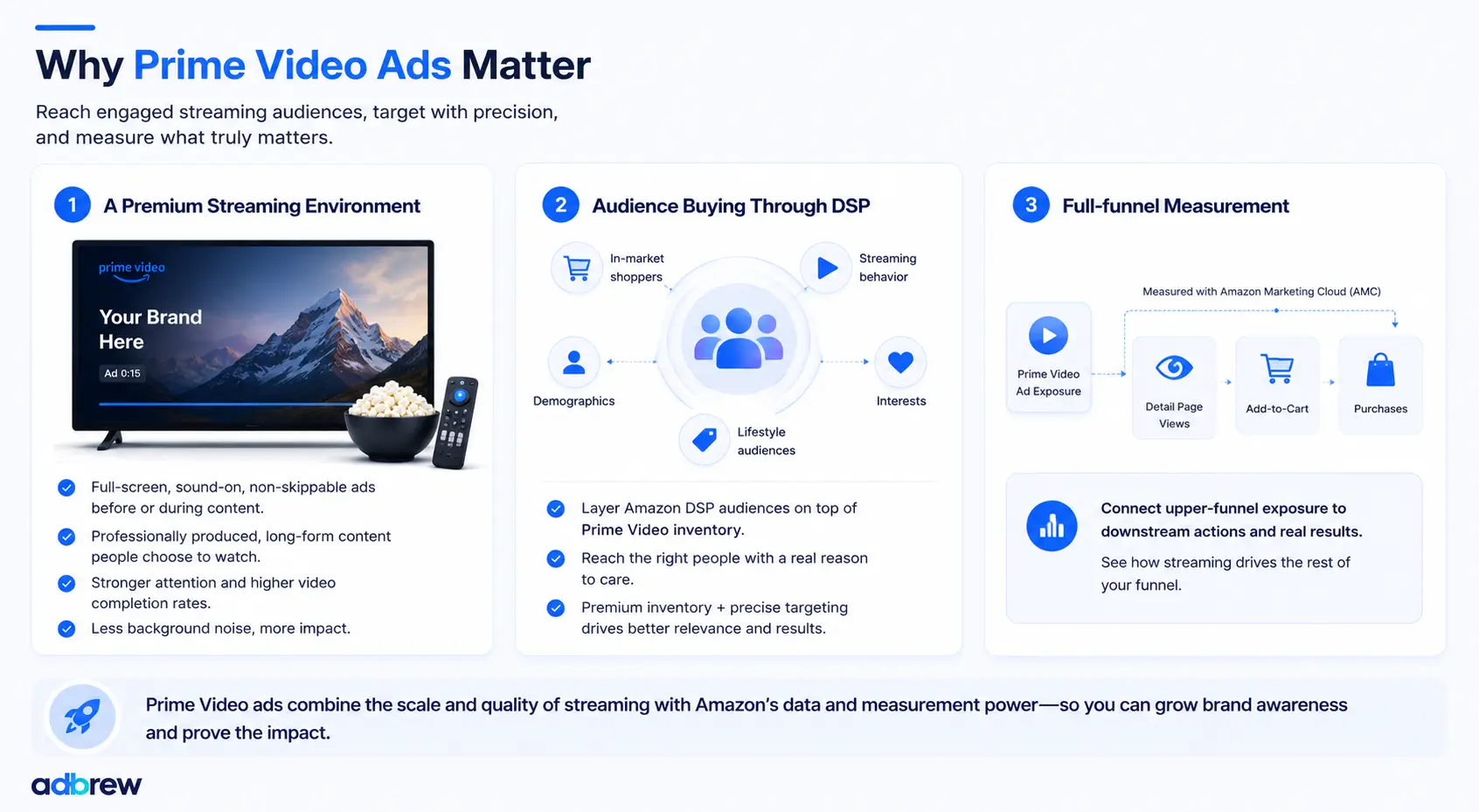
Prime Video ads are video advertisements that run inside the Prime Video streaming experience, across movies, TV shows, Amazon Originals, and live sports. Amazon shifted Prime Video to an ad-supported model by default in early 2024, which created one of the largest ad-supported streaming audiences anywhere. In the US alone, Prime Video reaches an average of more than 130 million ad-supported viewers a month.
Live sports is a big part of the draw. Prime Video now carries NFL Thursday Night Football, the NBA, WNBA, and NASCAR, and those audiences tend to skew younger and more engaged than linear TV. If sports is your angle, Amazon's live sports on Prime hub covers the schedule and audience data.
These ads show up across the full range of devices people stream on:
Connected TVs and smart TVs
Fire TV devices
Mobile devices
Desktop
Gaming consoles
The defining trait is that Prime Video advertising is audience-driven, not channel-driven. Instead of buying a program and taking whoever shows up, you reach viewers based on Amazon's shopping signals, streaming behavior, interests, demographics, and lifestyle audiences, all through Amazon DSP.
One more point worth stating plainly: you do not need to sell on Amazon to advertise here. Prime Video inventory is open to both endemic advertisers (brands that sell on Amazon) and non-endemic advertisers (brands that do not).
As of now, it is available across markets including the US, UK, Canada, Germany, Austria, France, Italy, Spain, Mexico, India, Japan, Australia, and Brazil, with availability varying by locale.
Before you start: what you need in place
Amazon DSP access. Either a self-serve seat, a managed-service relationship with Amazon, or access through an Amazon Ads partner seat.
An advertiser set up in DSP, with advertiser-level SSP Seat IDs. Deals created against Amazon Media are specific to each advertiser, so the Seat IDs matter.
Video creative that meets Streaming TV specs (covered near the end of this post).
A clear objective and KPI before you build anything. This decides your buy type, your order goal, and your bidding.
Minimums budget : Self-serve Amazon DSP typically carries a minimum monthly spend (commonly cited around $10k), and managed service usually starts higher (roughly $35k to $50k). Buying through a partner seat like Adbrew can remove that minimum.
Step 0: Understand the three buy types
Everything downstream depends on which deal type you choose, so get this right first.
Programmatic Guaranteed (PG) | Preferred Deal (PD) | Private Auction (PA) | |
|---|---|---|---|
Delivery | Guaranteed | Non-guaranteed | Non-guaranteed |
Pricing | Fixed CPM | Fixed CPM | Dynamic (you bid) |
DSP tech fee | No tech fee | Standard fee applies | Standard fee applies |
Priority | Highest | Below PG | Below PD |
Ad break targeting | Pre-roll targeting (Prime Video only) | N/A | N/A |
AI bidding (Brand+/Performance+) | Not supported | Partial | Best in class |
Best for | Launches, tentpoles, locked reach | Flexible fixed-price access | Lower cost, price discovery |
Planning | Best planned ~1 month ahead | Flexible | Best for last-minute booking |
Minimum flight / budget | 7-day minimum flight and minimum budget apply | None | No minimum flight or budget |
Important change to know: In the US, campaign booking for Prime Video, Prime Video "watch for free," and Twitch moved to PG and PA deals only starting 29 Sep 2025. Preferred Deals still exist in some markets and for some supply, but do not plan a US Prime Video campaign around a Preferred Deal.
Which one should you pick?
Choose Programmatic Guaranteed if: you have a launch date, a tentpole moment (a Prime Day flight, an NFL window, a product launch), or a reach commitment you cannot miss. You accept a fixed CPM in exchange for locked delivery.
Choose Private Auction if: you want the same inventory at a potentially lower, dynamic price, you are booking closer to launch, and you can live without a delivery guarantee. PA is also the right pick if you want Amazon's AI bidders (Brand+, Performance+, goal-seeking) doing the optimization.
Part 1: Create the deal proposal in Inventory Hub
This is the piece most guides skip. Before you can attach anything to a campaign, you have to create and get the deal approved.
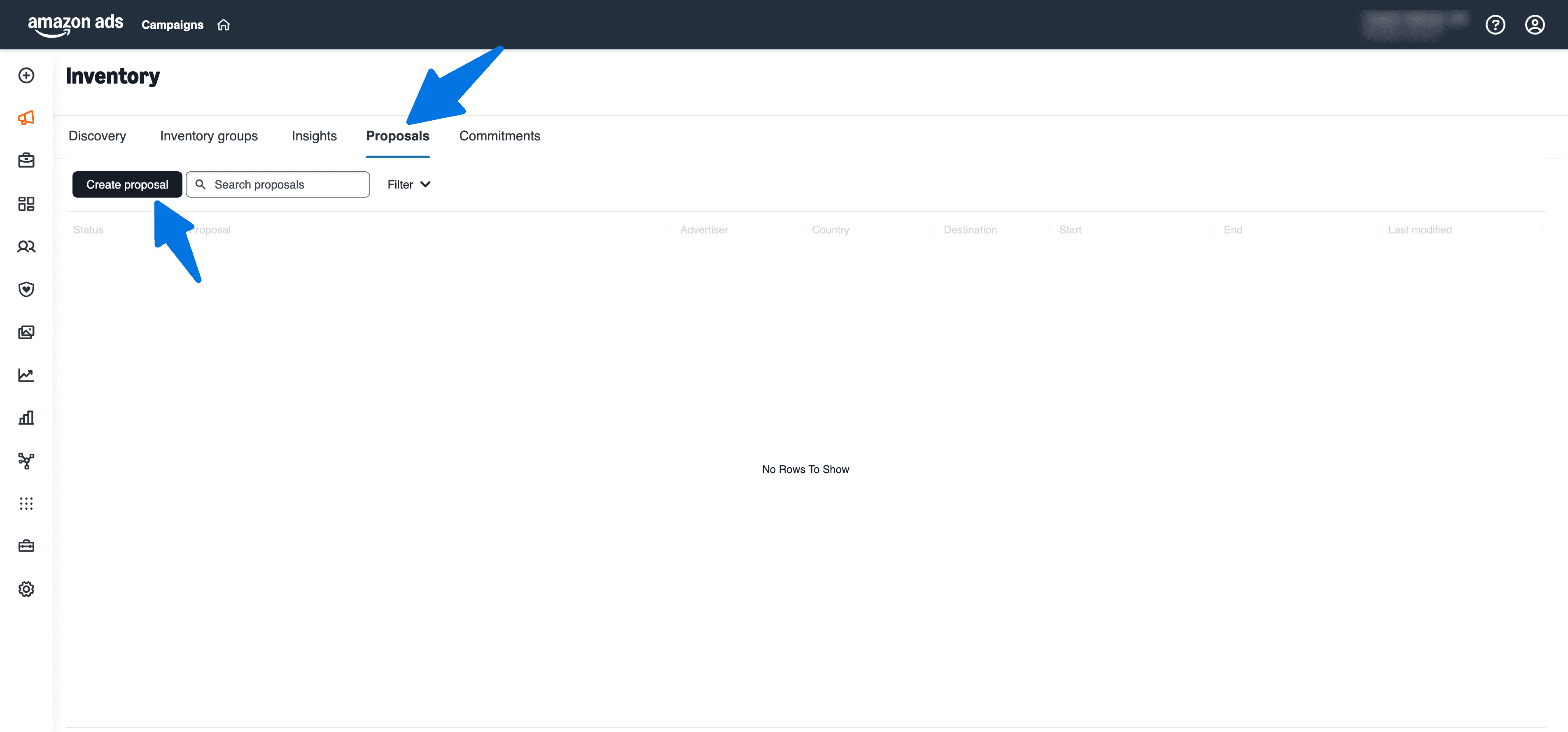
1. Open the Inventory Hub
Log in to Amazon DSP and click Campaign in the left panel.
Select the Inventory tab.
Go to the Proposals tab and click Create proposal.
2. Fill in the proposal header
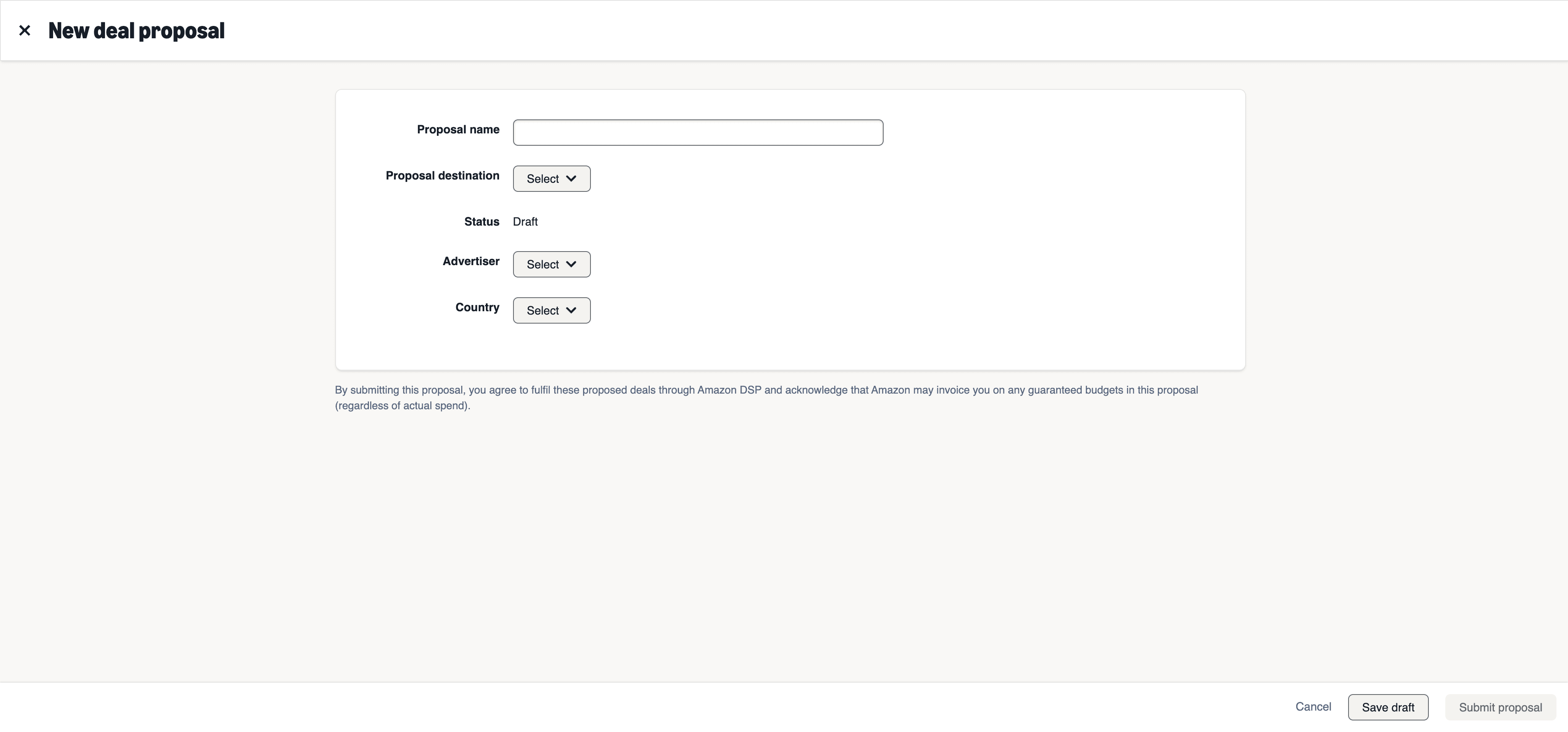
Field | What to enter |
|---|---|
Proposal name | A clear internal name |
Proposal destination (supply type) | Amazon Media (for Prime Video / Twitch), Amazon Publisher Cloud, or Amazon Publisher Direct |
Advertiser | Your advertiser. Remember: Amazon Media deals are advertiser-specific and need advertiser-level SSP Seat IDs |
Country/locale | Your delivery market |
3. Add the publisher product
Click Add publisher, and the available products for your region appear on one panel.
Rates are pulled automatically based on your location, advertiser, and agency.
You can filter by deal type, creative length, or publisher.
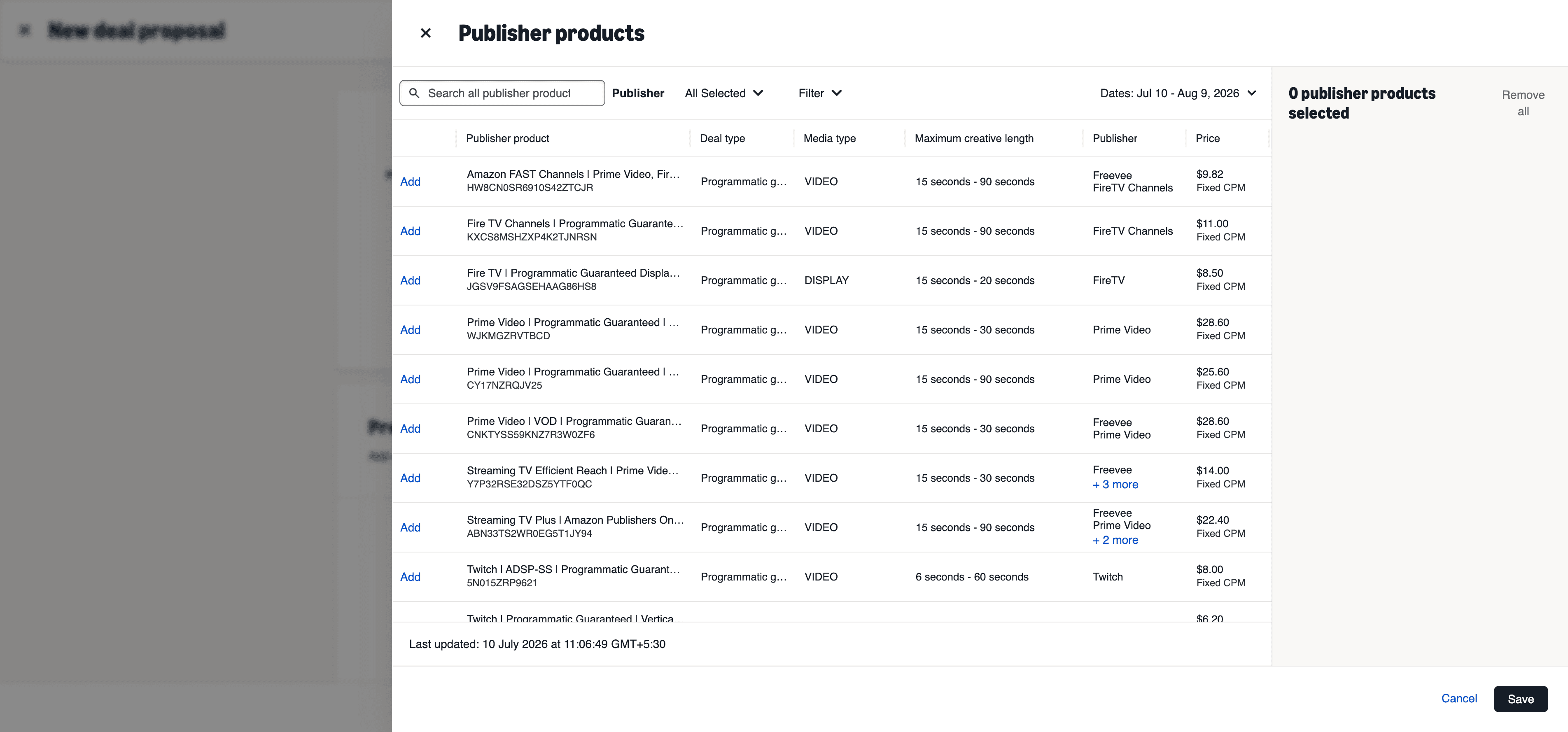
Watch the dates. CPM can differ by period. Check the flight dates before selecting a product, because the rate that populates depends on the window. If rates do not populate or look wrong, contact your Amazon rep before proceeding.
4. Customize the deal
Once a product is selected, you set:
Deal name
Budget
Dates
Timezone
Frequency capping
Product categories
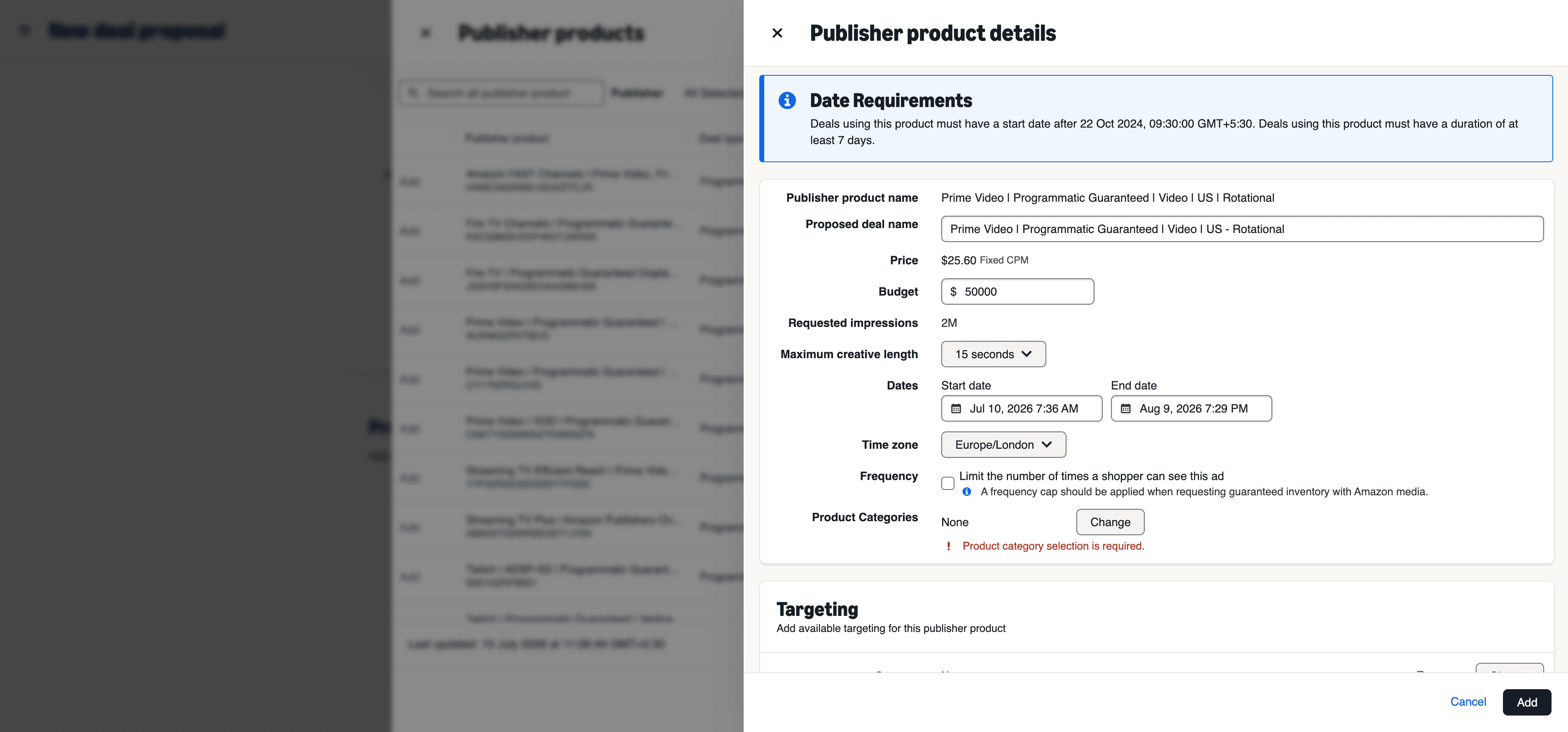
Two important notes here:
Frequency capping defined during PG deal creation is the only capping that gives a hard cap over delivery. A frequency group applied later at the line-item level will prioritize delivery over your cap.
Product categories drive competitive separation between ads. Avoid picking "General" or more than three sub-categories.
5. Add targeting to the proposal
You can layer targeting based on product capabilities:
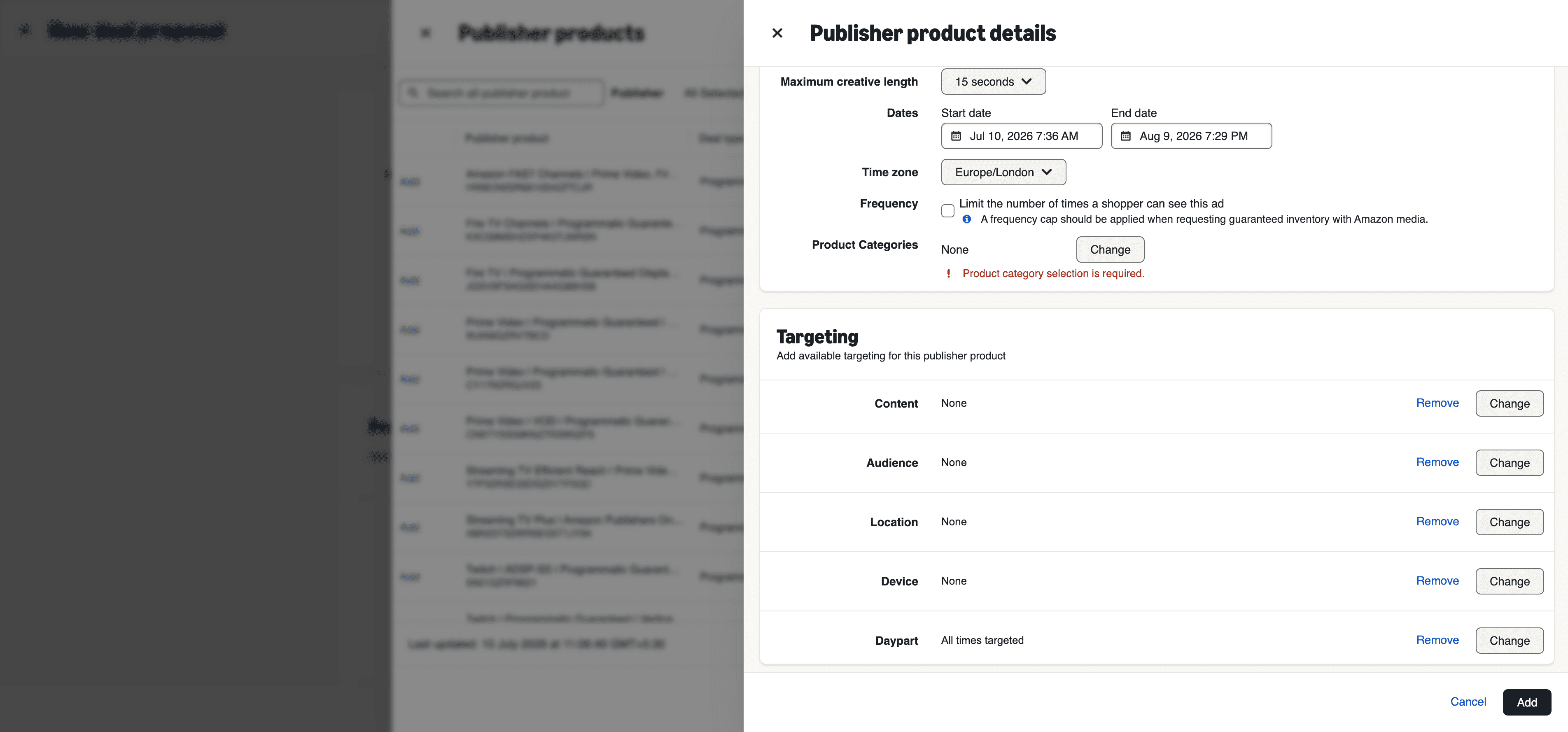
Content module: genre, rating, or specific collections.
Audience module: demo, in-market, lifestyle, interest, custom, life event, and third-party audiences.
Location module: target or exclude by region, city, postal code, or DMA. You can paste up to 2,500 zip codes.
Device module: device type and OS.
Daypart module: the days and hours your ads run.
Custom audiences need lead time. Custom-built audience segments must be shared with Amazon Media before they are available to build new deals. Ask your Amazon rep to start that process early.
Location default gotcha: default location targeting follows the publisher setting. Add "Use real-time location" to guarantee in-locale delivery, or remove it for maximum reach.
6. Forecast and submit
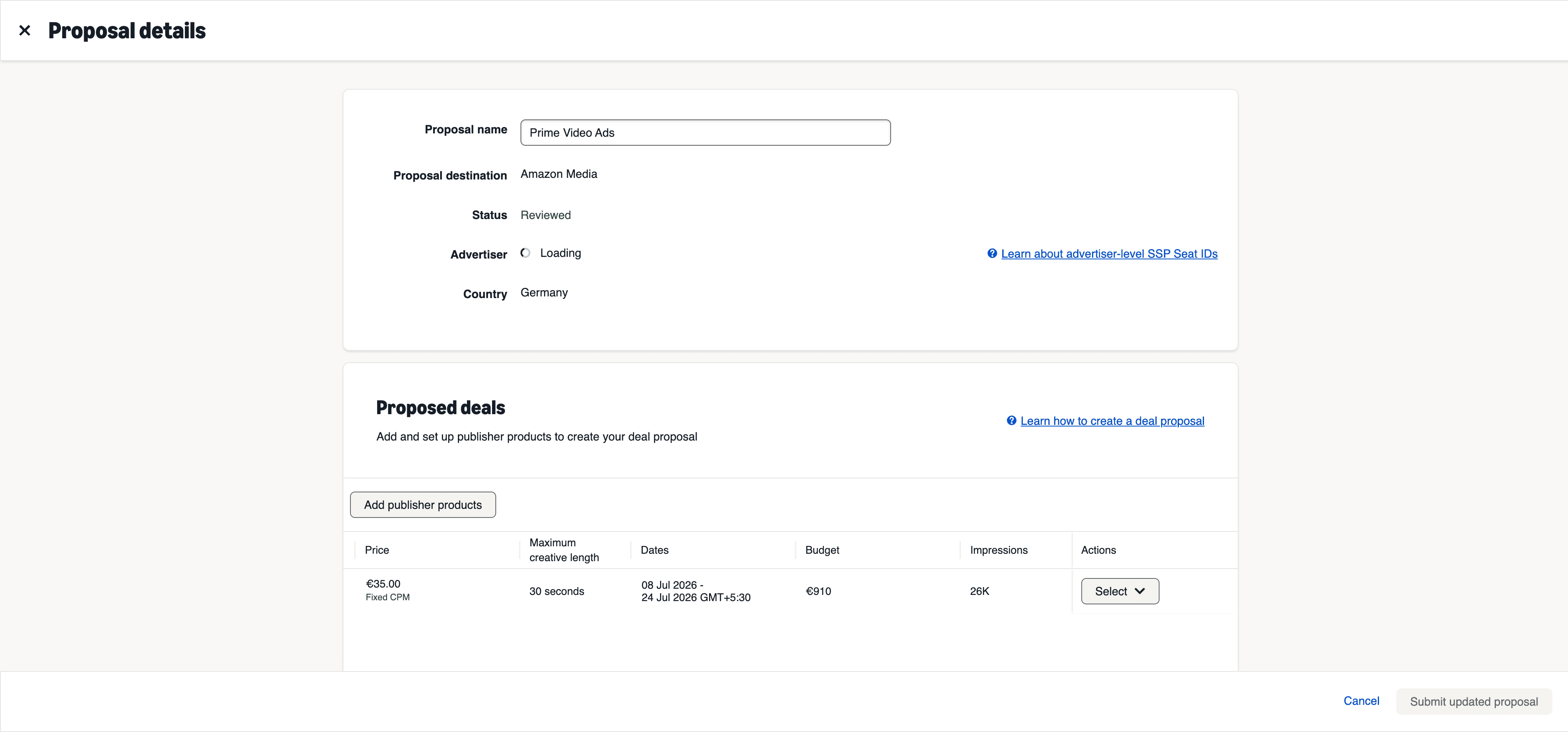
Before saving each proposed deal, Amazon DSP requests a forecast from Amazon Media to confirm there is enough supply. If supply matches, you can still tweak or remove the deal, or submit the proposal to publish it. Once approved, the deal appears in Inventory Hub, ready to attach.
Revising a PG deal later
You can revise a published PG deal as long as the inventory forecast allows it. Open the proposal, click Actions, and select Revise approved deal. You can change targeting, frequency capping, budget, and start/end dates (subject to the 7-day minimum flight).
If the deal is already live, you can only revise the end date. If the new forecast has insufficient inventory, you cannot finalize the revision, so update or discard it.
Part 2: Create the order in Campaign Manager

With an approved deal in hand, build the order. These are the PG best practices straight from the playbook.
Amazon deal: do not check the "Use Amazon marketplace deals" checkbox.
Goal: Awareness. Recommended KPI: Video Completion Rate (VCR), Cost Per Completed View (CPCV), or Reach.
Optimization: use the "Prioritize spending full budget, while maximizing performance" bidding priority. Automated budget allocation is not the best practice here, since the recommendation is one order and one line item per PG deal.
Order type: Billable.
Flights: order budget and start/end date need to match the line item budget and start/end date, and it must be one contiguous flight.
Budget cap: keep it uncapped at the order level and apply any cap at the line-item level.
Agency fee: apply the agency fee percentage at the order level so your budget delivers in full.
Frequency: keep it uncapped at the order level, with frequency preferences applied at the deal level.
The single most common PG mistake: set your order end date 24 hours AFTER the deal end date to avoid delivery issues at the tail of the flight.
Part 3: Create the line item and attach the deal (PG)
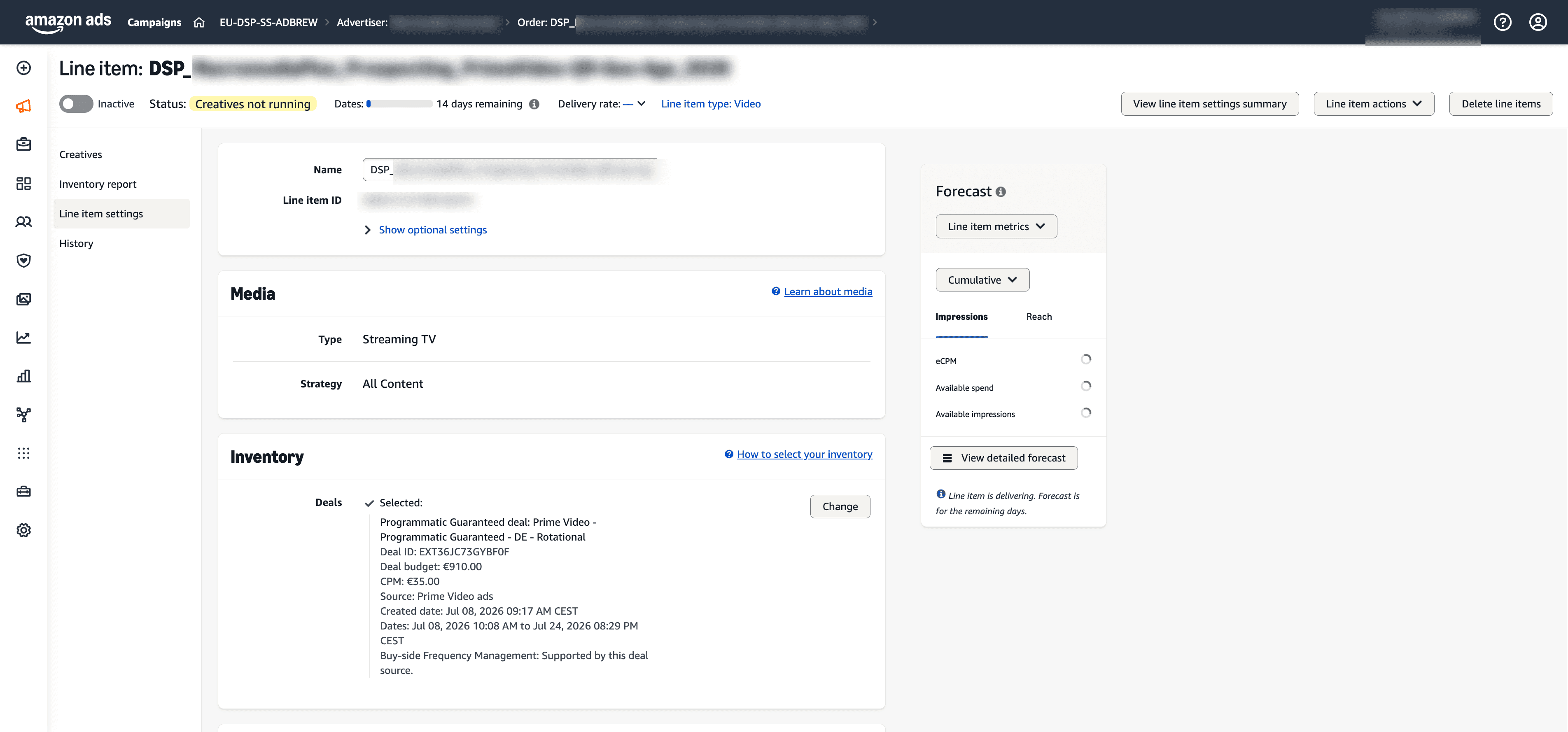
1. Media. Create a line item and choose Type: Streaming TV.
2. Deals. Next to the Deals section, click Change to open the Deals window. Search for your PG deal by name or ID.
3. Add the deal.
Search for the deal in the pop-up.
Click Add to target it.
Click Save changes to apply it to the line item.
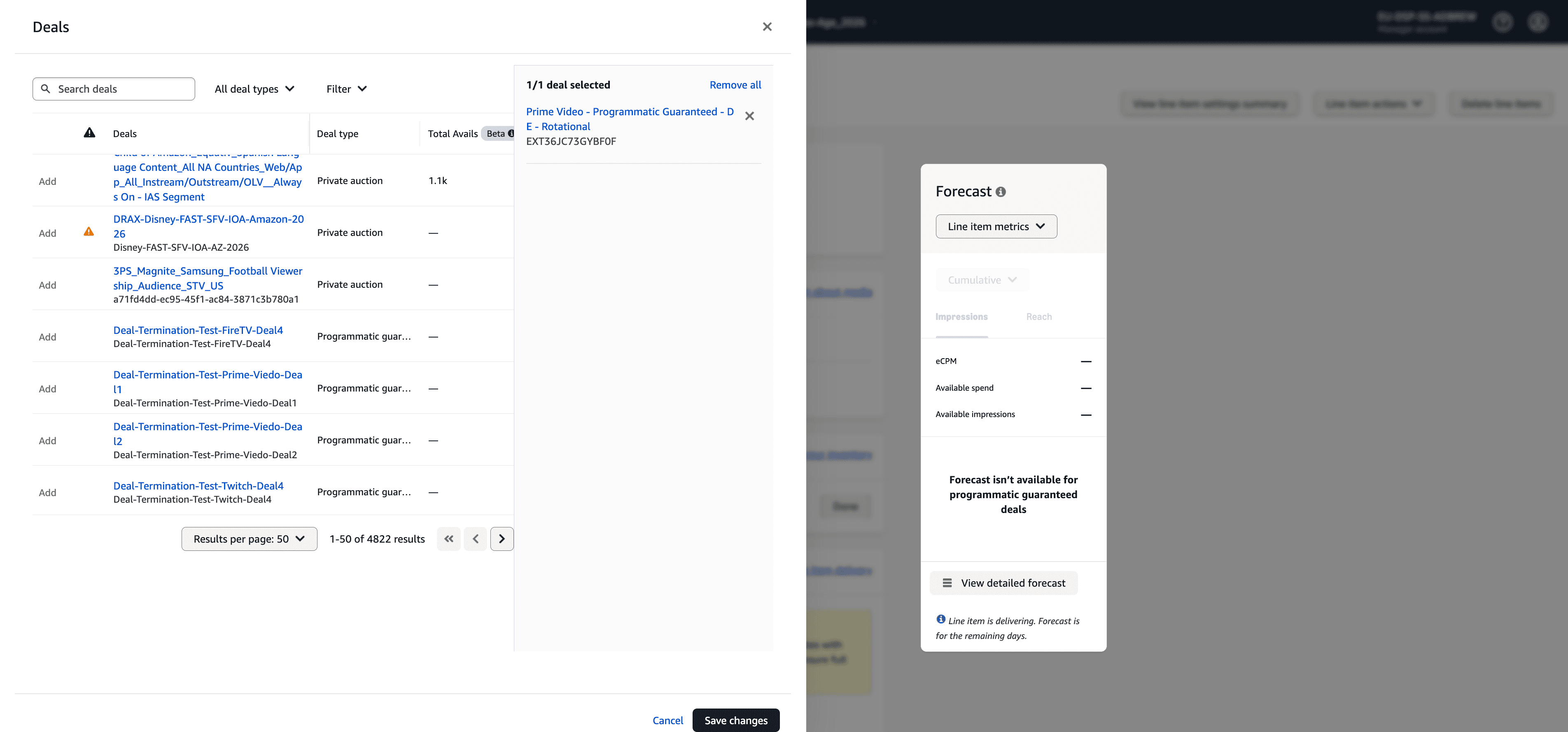
4. Flights and budget. Flight dates and budget are added automatically based on your order budget and PG deal parameters. Most other line-item settings are locked, because for PG the settings live at the deal level.
Note: when targeting a PG deal, the line item inherits the deal's targeting. You are not re-targeting at the line item, you are activating what you already built in the proposal.
Running a Private Auction instead
The proposal and line-item flow is similar, but the order and bidding setup differ. Key differences for PA (and Preferred Deals where still available):
Order setup
Do not auto-allocate spend if you have a specific budget for a publisher or deal.
Goal: PA can run on Awareness or Consideration.
KPI: Reach or Frequency for Awareness, VCR or CPCV for Consideration.
Use the "Prioritize spending full budget, while maximizing performance" bidding priority to scale.
Do not set a budget cap unless you have a hard daily or monthly limit, since a cap can stop your budget delivering in full.
Line item and inventory
Media Type: Streaming TV.
Products: assign one product subcategory that classifies the brand (no more than three), and avoid "General" or "Other."
Inventory: to deliver only on Prime Video, remove Amazon, Amazon Publisher Direct, and third-party exchange supplies. Keep them if you want maximum reach across all video sources.
Deals: click Change, search your PA deal, click Add, then Save changes.
Bidding (PA)
Set your Base bid and your Maximum average CPM. You can let DSP automatically optimize, or manually set the eCPM you are willing to pay.
If you set a Max Average CPM, DSP clears some impressions above and some below it and paces toward that average.
If you leave Max Average CPM unset, DSP optimizes on your behalf.
Any additional audience fees show under Delivery > Fees (Amazon audience fee, third-party audience fee, third-party pre-bid fee, and the Amazon DSP fee).
Why buyers reach for PA: the same Prime Video inventory that clears at a fixed rate under PG can come in lower under a dynamic auction. The trade-off is you give up the delivery guarantee.
Creative specs and requirements
Streaming TV ads on Prime Video are full-screen and non-skippable. Get these right before you build, because creative rejections are the number one cause of a slipped launch.
Spec | Requirement |
|---|---|
Format | MP4 (site-served) |
Aspect ratio | 16:9 |
Resolution | Minimum 1920x1080 |
Bitrate | Minimum 15 Mbps (helps maximize supply coverage) |
Durations | 15 / 30 seconds standard; longer lengths available in some locales and supply sources |
Letterbox / pillarbox | Strongly discouraged, can conflict with interactive overlays |
Pause ad (optional format) | Static 1920x1080 JPEG or PNG, max 2MB |
Duration availability varies by supply source, so confirm the current spec sheet for your market before you produce assets. For anything beyond standard lengths, check with your Amazon rep.
Upload assets at least 48 hours before your start date to allow for the extra encoding Amazon does for Prime Video. And attach creative as soon as the campaign is booked, otherwise you risk not maximizing delivery.
Add interactivity if you can
Interactive video ads add a "click or scan to add to cart / learn more" overlay, and they are compatible with PG buy types on Prime Video inventory. Amazon's own data shows meaningful lifts from interactivity:
+4.6x Detail Page Views vs. non-interactive
+6.3x Add to Carts vs. non-interactive
+2.5x Orders vs. non-interactive
(Amazon internal data, US, Oct 2024 to Apr 2025. Lifts vary by category.)
Measurement: prove it worked
CPM and completion rate are table stakes, not the answer. Because Prime Video sits mid and upper funnel, blended last-click will understate it. Measure with:
Amazon Marketing Cloud (AMC): path analysis, incrementality, and audience insights. AMC even lets you see the Prime Video viewership of your existing customers so you can size the opportunity.
Brand Lift Studies: aided awareness, favorability, purchase intent (Amazon Brand Lift, Kantar, and other partners).
New-to-brand and detail page views: the practical signals that streaming exposure is pulling new customers in.
Retargeting: move exposed viewers down the funnel with DSP and Sponsored Ads.
If you already manage Sponsored Ads and DSP in one place, tie the Prime Video flight back to total sales and new-to-brand lift, not just video metrics in isolation. Tools like Adbrew centralize Sponsored Ads, DSP, and no-code AMC in one dashboard, which makes that full-funnel read a lot less painful than stitching exports together.
Pricing reality check
There is no public Amazon rate card, and CPMs move by season, targeting, and content. Treat these as vendor-estimated ranges, not quotes:
Standard Prime Video CPMs commonly land in the high-$20s to mid-$40s.
Private Auction can clear lower (buyers have reported figures in the low $20s) because pricing is dynamic.
CPMs spike during Q4 and tentpole moments, then normalize.
Plan budget around your objective and flight timing, and expect premium pricing for premium content windows.
Common mistakes to avoid
Checking "Use Amazon marketplace deals" on a PG order. Leave it unchecked.
Order end date matching the deal end date. Set the order end 24 hours later.
Mismatched order and line-item flights. Budgets and dates must match, one contiguous flight.
Relying on a line-item frequency group for a PG cap. Only capping set during deal creation is a hard cap.
Uploading creative late. Give it 48 hours before start.
Letting a booked PG deal sit unactivated. If you do not activate within 3 days of the scheduled start, or it stays paused for more than 3 days, the guaranteed deal is voided and you start over.
Picking "General" or too many product sub-categories, which weakens competitive separation.
Forgetting SSP Seat IDs. Amazon Media deals are advertiser-specific and need advertiser-level Seat IDs.
FAQs
Can Prime Video ads be run through Amazon DSP?
Yes. Prime Video ads run through Amazon DSP, where you set targeting, audience segmentation, and measurement. The inventory is accessed through deals rather than the open auction.
Are Prime Video ads skippable?
No. Prime Video ads are non-skippable, full-screen, and sound-on. You may not always see a 100% video completion rate, though, because of technical factors, viewer drop-off, or measurement limitations.
Do I need to sell on Amazon to advertise on Prime Video?
No. Prime Video ads are open to both endemic advertisers (brands selling on Amazon) and non-endemic advertisers (brands that do not sell on Amazon).
Is Prime Video advertising only for large brands?
Not necessarily. There is no fixed minimum spend for streaming TV ads on Amazon, but CPMs are higher than standard display, so mid-sized brands tend to use Prime Video strategically for launches, seasonal campaigns, or category expansion rather than always-on.
How are Prime Video ads different from traditional TV advertising?
Traditional TV mostly buys broad demographic reach. Prime Video adds audience-based targeting, digital measurement, and optimization through Amazon DSP, so you can reach specific audiences and see how exposure affects downstream actions.
What ad lengths does Prime Video support?
Standard durations are 15, 20, and 30 seconds. Specs can vary by supply source, so confirm the current requirements on Amazon's official ad-specs page before producing creative.
Do I need to sell on Amazon to run Prime Video ads?
No. Amazon DSP is open to non-endemic advertisers too. You lose ASIN-level closed-loop attribution, but you can still use Amazon's first-party audience signals and measure with AMC, lift studies, and your own analytics.