Amazon Advertising Basics: How Amazon Ads Work in 2026

Nishant Singh

TL;DR
Key takeaways
Amazon advertising is an auction: you pick products to promote, choose targets, set a bid and budget, and usually pay per click.
In 2026 it all runs in Amazon Ads Agent: sponsored ads, Display, Video and Audio campaigns, and Full-Funnel Campaigns.
Start with Sponsored Products on about $10 to $30 a day, then add Sponsored Brands and display ads once you have data.
Judge results on ACOS against your margin, then on TACOS and new-to-brand customers, not on one week of numbers.
Amazon advertising lets brands pay to show products to shoppers on Amazon and beyond. You choose what to promote and who should see it, set a bid and a daily budget, and Amazon runs an auction each time a shopper searches, browses or streams.
Most self-serve ads charge only when someone clicks.
This is our beginner's map of Amazon Ads as it works in late 2026: every ad type, who can use each one, how the auction and costs work, the metrics that matter, and a 90-day plan for your first campaigns. Each section links to the deep dive when you are ready for more.
What Is Amazon Advertising?
Amazon advertising (Amazon Ads) is Amazon's advertising business. It sells search ads inside the Amazon store, display and video ads on and off Amazon, and streaming TV and audio ads on Prime Video, Fire TV, Twitch and Amazon Music.
It is also one of the largest ad businesses in the world. Amazon reported $19.8 billion in advertising services revenue for Q2 2026, up 26% from a year earlier.
The name of the platform changed this year. On September 29, 2026, Amazon renamed its unified platform, formerly the ads console plus Amazon DSP, Amazon Ads Agent. Its conversational AI features are in closed beta and rolling out.
Amazon Ads Agent offers three campaign types:
Sponsored ads: Sponsored Products, Sponsored Brands and display ads, bought mostly per click.
Display, Video and Audio (DVA) campaigns: what used to be Amazon DSP, bought per thousand impressions.
Full-Funnel Campaigns: one campaign where Amazon's AI spreads a budget across sponsored ads, display, video and streaming TV.
Older guides call all of this Amazon Marketing Services (AMS) or Amazon Advertising. Those names are retired, but the search ads underneath work the way they always have.
Why Amazon Ads Matter for Sellers and Brands
Amazon shoppers are already shopping. A search for "insulated water bottle" is a buying signal that a social feed rarely gives you.
Amazon also sees the sale. Because the ad and the purchase happen in the same store, your reports show orders and sales attributed to each ad, which most other channels can only estimate.
The other reason is crowding. On a busy keyword, the first screen of results can be mostly sponsored, so a product that is not advertised often starts below the fold.
How Does Amazon Advertising Work?
Every sponsored ad is chosen in an auction. When a shopper searches or opens a product page, Amazon looks at every eligible ad, weighs how relevant each one is and how much each advertiser bid, and fills the slots.
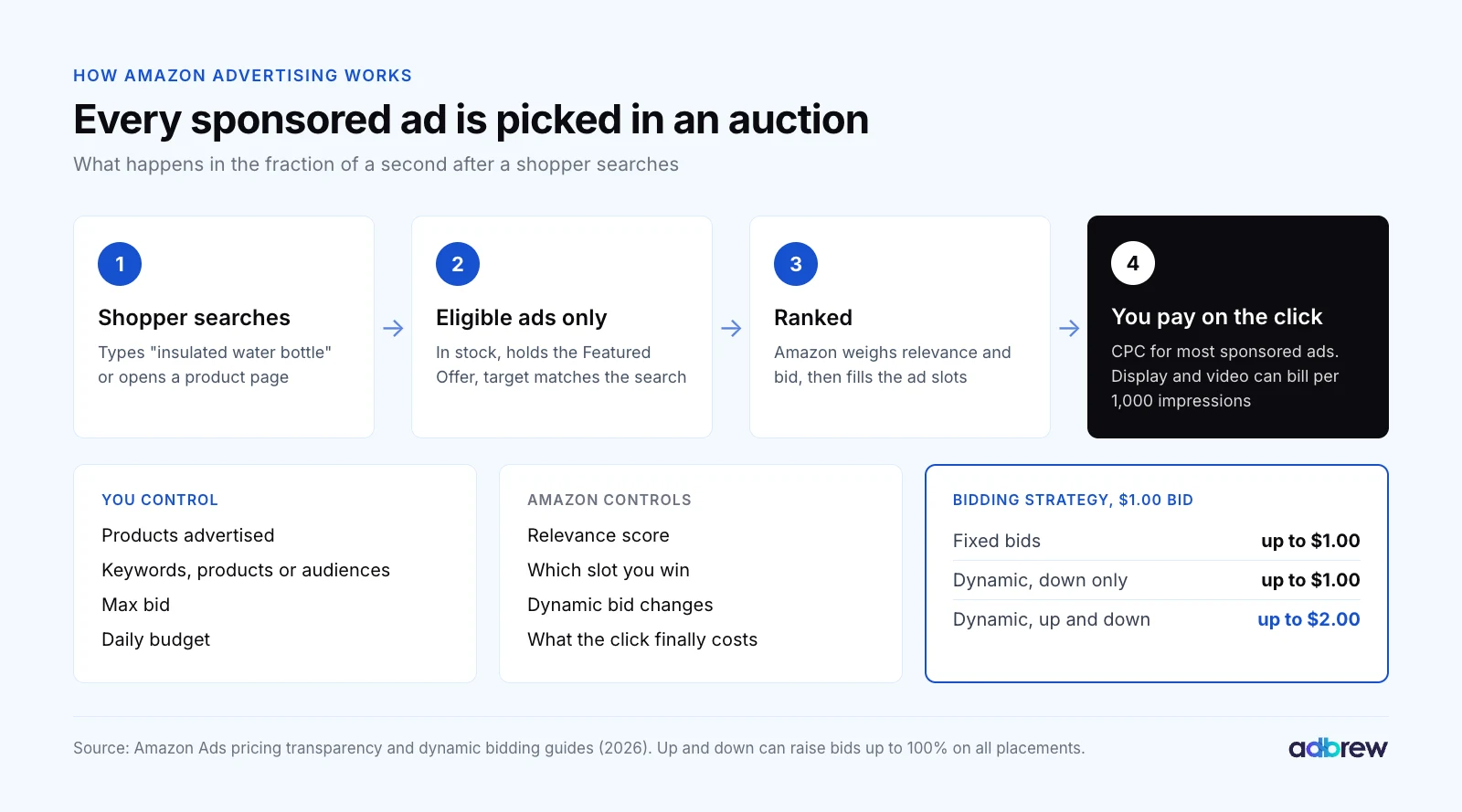
You control four things:
What you advertise: one or more products (ASINs), or for video and display, your brand.
Who sees it: keywords, products, categories or audiences, depending on the ad type.
Your bid: the most you will pay for a click, or for 1,000 impressions on display and video.
Your budget: the most a campaign can spend in a day, or across a flight.
Amazon controls the rest. Per its pricing transparency guide, ranking "primarily considers the keywords advertisers bid on, the amount advertisers bid" and relevance, and most sponsored ads are charged "based on customer action, typically cost per click (CPC)."
Eligibility comes before bidding. A Sponsored Products ad only serves when the product is in stock and eligible for the Featured Offer (the Buy Box), per Amazon's Sponsored Products page. Lose the Buy Box and the ad stops, budget or not.
Bidding Strategies and What You Actually Pay
Your bid is a ceiling you set, but Amazon can move it. With "dynamic bids, up and down", Amazon's dynamic bidding guide says it may raise or lower bids "by up to 100% for all placements", so a $1.00 bid can become $2.00.
That is why we start beginners on "dynamic bids, down only". It cuts bids when a click looks less likely to convert and never raises them. Our guide to Amazon PPC bidding strategies covers when to switch.
How much below your bid you pay is now a live question. On August 31, 2026, the FTC and 22 states sued Amazon, alleging that its search ads, described as second-price auctions, charged Sponsored Products advertisers their own winning bid "close to 80% of the time" since 2019.
These are allegations, and Amazon disputes them. Amazon told reporters the suit misunderstands how its auctions work. For a beginner, the practical lesson is simple: set every bid at a price you are happy to pay in full.
Every Amazon Ad Type in 2026
Amazon now sells seven things a beginner will meet. The first three are the self-serve sponsored ads most brands start with.

1. Sponsored Products
Sponsored Products promote a single product in search results and on product pages. They look almost like organic listings, are billed per click and are where nearly every account starts.
You can target automatically (Amazon picks keywords and products) or manually, with keywords and products you choose. Our Sponsored Products guide covers setup, structure and the 2026 changes in depth.
2. Sponsored Brands
Sponsored Brands show your logo, a headline and several products or a video, mostly at the top of search results. They can send shoppers to your Brand Store or a product page.
Sellers need Amazon Brand Registry. In May 2026 Amazon added Sponsored Brands collections, which group up to 10 related products in one ad. See our Sponsored Brands guide for every format.
3. Display Ads (Formerly Sponsored Display)
Display ads are Amazon's self-serve display ads. Inside Amazon Ads Agent, as of 2026, Amazon calls Sponsored Display simply display ads.
They target products, categories and audiences, never keywords. Per Amazon's display ads guide, they show on product pages, the homepage and search results, and off Amazon on Twitch and third-party apps and sites, billed per click or per 1,000 viewable impressions.
Their best beginner use is remarketing: bringing back shoppers who viewed your product and left. Our Sponsored Display guide explains targeting, bidding and the new attribution model.
4. Prompts in Sponsored Products and Sponsored Brands
Prompts are AI-written questions or product facts that appear with your ads in search results and on product pages. Tapping one can open a conversation in Alexa for Shopping, Amazon's shopping assistant.
They are not a separate campaign. Per Amazon's launch note, prompts opened in beta in November 2025, became generally available in the US on March 25, 2026, enroll your campaigns by default and are billed per click. Our prompts guide shows how to review them.
5. Display, Video and Audio Campaigns (Formerly Amazon DSP)
Amazon DSP (demand-side platform) is how advertisers buy display, video and audio ads programmatically, on Amazon and across the open web. Since September 29, 2026, DSP campaigns are Display, Video and Audio (DVA) campaigns.
The structure kept its three tiers with new names: order became campaign, line item became ad group, creative became ad. A simpler flow called DVA+ rolls out in the US from late October 2026, while non-US DSP users keep the classic flow for now.
DVA campaigns are the only Amazon ads open to brands that don't sell on Amazon. Start with what Amazon DSP is, then the DSP ad types, DSP targeting and how to create a DSP campaign.
6. Streaming TV and Prime Video Ads
Streaming TV ads are full-screen video ads on Prime Video, Fire TV, Twitch and other streaming apps. Amazon puts Prime Video's ad-supported reach at more than 315 million viewers a month worldwide.
They are bought through Display, Video and Audio campaigns, self-service or managed. Sponsored TV, which used to be a separate self-serve campaign type, is now part of DVA+. Our Prime Video ads guide walks through setup.
7. Full-Funnel Campaigns
Full-Funnel Campaigns are a single campaign that spans sponsored ads, display, video and streaming TV. You give Amazon your products, a budget and an optional ROAS (return on ad spend) floor, and its AI picks the formats and splits the money.
Per Amazon's announcement, they are in open beta for US advertisers who sell on Amazon, and run alongside your existing campaigns. We treat them as a test, not a replacement for campaigns you can read and control.
Free Tools That Make Ads Work Better
Two free tools sit next to the ads. A Brand Store is a free multipage storefront for Brand Registry sellers and vendors, and the best landing page for Sponsored Brands; our storefront guide covers it.
Amazon Attribution measures sales from ads you run off Amazon, such as Google or Meta. Per Amazon's Attribution guide, it uses a 14-day last-touch model.
Who Can Use Each Amazon Ad Type?
Eligibility is the first filter. Two things decide most of it: whether you sell on Amazon, and whether your brand is in Brand Registry.
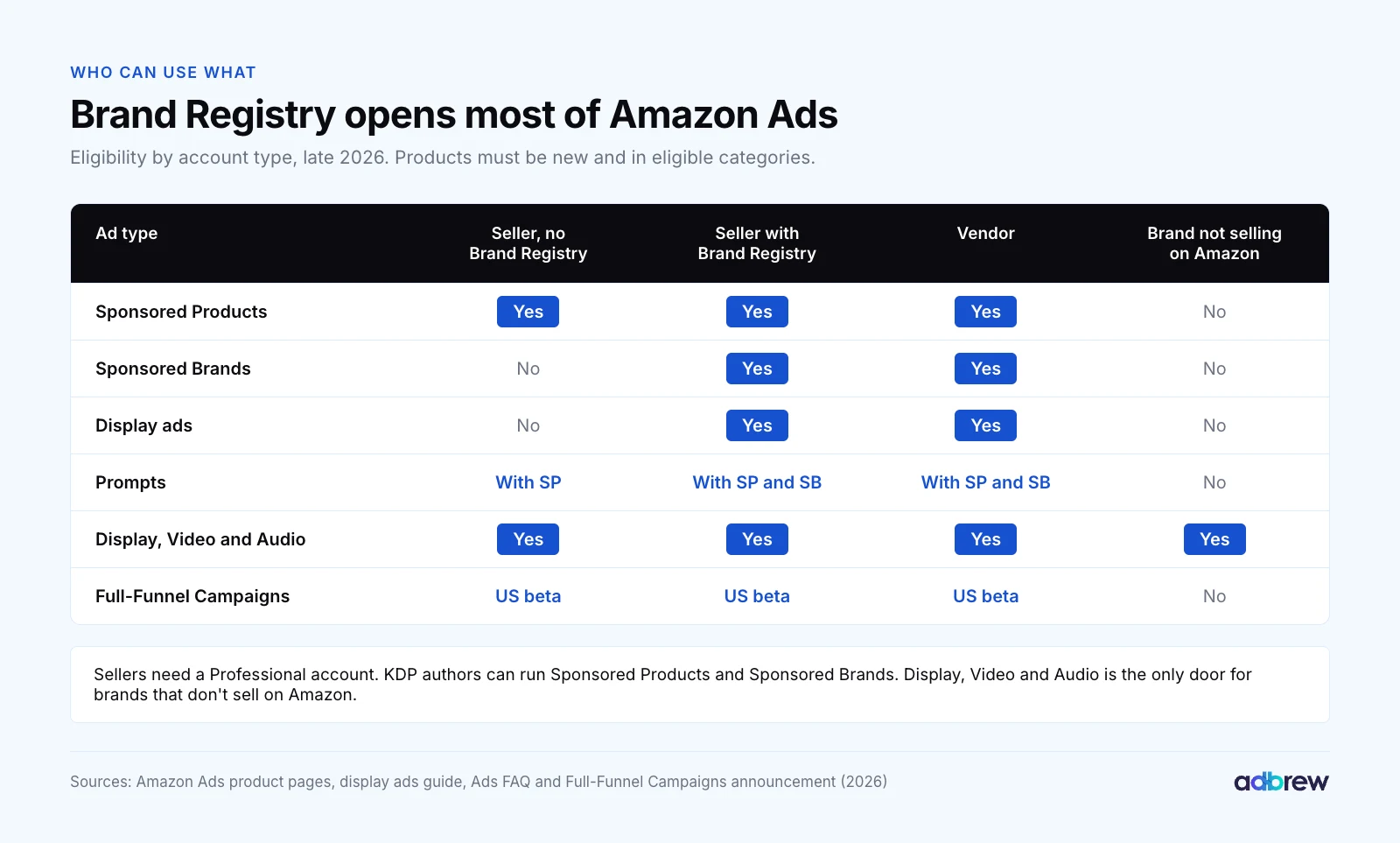
Ad type | Seller, no Brand Registry | Seller with Brand Registry | Vendor | Brand not selling on Amazon |
|---|---|---|---|---|
Sponsored Products | Yes | Yes | Yes | No |
Sponsored Brands | No | Yes | Yes | No |
Display ads | No | Yes | Yes | No |
Prompts | With SP campaigns | With SP and SB | With SP and SB | No |
Display, Video and Audio | Yes | Yes | Yes | Yes |
Full-Funnel Campaigns (US beta) | Yes, US | Yes, US | Yes, US | No |
The details come from Amazon's Sponsored Products and Sponsored Brands pages and the Amazon Ads FAQ. Sellers need a Professional selling account, products must be new and in eligible categories, and adult, used, refurbished and closed-category products cannot be advertised.
Kindle Direct Publishing (KDP) authors can run Sponsored Products and Sponsored Brands too. If you are a seller without a trademark yet, Brand Registry is worth starting early, because it opens Sponsored Brands, display ads and a Brand Store.
Not sure which account type fits? Our guide to Amazon seller vs vendor compares them.
How Much Does Amazon Advertising Cost?
There is no fee to start. Sponsored Products campaigns have "no monthly or upfront fees", and the Amazon Ads FAQ sets the minimum daily budget for Sponsored Products and Sponsored Brands at $1.00.
What you spend is your clicks (or impressions) multiplied by what each one costs. Clicks get pricier with competition: a crowded category, a popular keyword, top-of-search placement, or Q4 and Prime Day.
Ad type | How you pay | Minimum |
|---|---|---|
Sponsored Products | Per click (CPC) | $1 a day |
Sponsored Brands | CPC, or per 1,000 viewable impressions (vCPM); reserve share of voice is a fixed upfront price | $1 a day; reserve share of voice has a spend commitment |
Display ads | CPC or vCPM | None stated |
Display, Video and Audio | Per 1,000 impressions (CPM) | Self-service: none stated. Managed service: typically $50,000, varies by country |
Full-Funnel Campaigns | Budget you set | None stated |
The DSP minimum confuses people. Self-service DVA campaigns run on budgets you set, with no minimum Amazon states; the managed service typically needs $50,000, and the minimum varies by country.
New sellers pay as they go. Per the FAQ, charges come from your seller balance or a card, and the credit limit starts at $50 and rises step by step to $500 as payments succeed.
We don't quote an "average CPC" for Amazon. It varies too much by category to plan with. Use the suggested bid range Amazon shows for each keyword in the console, and plan from your own margin (more on that below).
The Core Amazon Ads Metrics
Amazon reports a dozen columns. Seven drive almost every decision a beginner makes.
Metric | Formula | What it tells you |
|---|---|---|
ACOS | Ad spend ÷ ad sales | What each ad-driven sale costs you |
ROAS | Ad sales ÷ ad spend | The inverse of ACOS |
TACOS | Ad spend ÷ total sales | Ads as a share of the whole business |
CTR | Clicks ÷ impressions | Whether the ad and main image earn the click |
CVR | Orders ÷ clicks | Whether the listing closes the sale |
CPC | Spend ÷ clicks | What the auction charges you |
New-to-brand | Orders from first-time buyers of your brand | Whether ads grow your customer base |
ACOS (advertising cost of sales) is the number everyone checks first, and it only means something next to your margin. If your profit margin before ads is 30%, your break-even ACOS is 30%.

Read ACOS next to TACOS (total advertising cost of sales). A falling TACOS while ad spend holds steady means ads are lifting total sales, organic included; our TACOS guide explains why. Our ACOS guide covers the levers that bring it down.
Two 2026 changes affect how you read the numbers. From January 1, 2026, vCPM Sponsored Brands, vCPM Sponsored Display and DSP ads in the Amazon store use a new view attribution model; the old count survives as "all views" metrics.
And Amazon moved reporting into one place. Unified reporting became generally available on June 8, 2026; legacy Sponsored Ads and DSP report pages are read-only from December 17 and retire on December 31, 2026.
Allow for lag. Amazon's display guide notes that it can take 7 to 14 days for sales to be attributed to a click or view, so last week's numbers are still filling in.
Amazon Ads Terms You'll See in the Console
The console uses a small vocabulary. Learn these and every guide after this one reads faster.
Term | What it means |
|---|---|
Portfolio | A folder of campaigns, often one per brand or product line, with an optional shared budget cap |
Campaign | Holds the budget, dates and bidding strategy |
Ad group | Holds the products you advertise and the targets you bid on |
Keyword | A word or phrase you bid on, with a match type: broad, phrase or exact |
Product targeting | Bidding on specific ASINs or categories instead of keywords |
Search term | What the shopper actually typed. It can differ from your keyword |
Negative keyword | A term you block so your ad stops showing on it |
Placement | Where the ad showed: top of search, rest of search or product pages |
The difference between a keyword and a search term trips up most beginners. Our guides to keywords vs search terms, match types, the search term report and negative keywords go through them one at a time.
How to Start Amazon Advertising With a Small Budget
You can start with $10 a day. Amazon's new advertiser guide says "just $10 a day can help you get clicks and sales" and recommends Sponsored Products with automatic targeting as the first campaign.
A small budget is fine. A small budget spread across too many campaigns is not, because no single target ever gets enough clicks to judge.

1. Get the Listing Ready First
Ads amplify a listing; they don't fix one. Amazon's guide recommends advertising products with five or more reviews, a 3.5-star rating or better, four or more images and at least three bullet points, and holding the Featured Offer "ideally 90% or higher" of the time.
2. Do the Margin Math Before You Bid
Work out your break-even ACOS: price minus product cost, fees and shipping, divided by price. That number is the most you can pay per sale without losing money.
Then work back to a bid. At a 30% break-even ACOS, a $25 product and a 10% conversion rate, you can afford about $0.75 a click ($25 × 30% × 10%).
3. Launch One Auto Campaign and One Manual Campaign
Run one automatic Sponsored Products campaign to discover search terms, and one manual campaign on 10 to 20 keywords from your own keyword research. Keep both on "dynamic bids, down only".
Put your best one to three products in. One product per ad group keeps the data clean.
4. Protect Your Brand Name
Add a small campaign on your own brand terms. These clicks are cheap and convert well, and if you skip them a competitor will happily buy them.
5. Add Sponsored Brands and Display Ads Later
Once you have Brand Registry and a few weeks of data, add Sponsored Brands on your proven keywords and display ads to remarket to shoppers who viewed your products. Leave DSP for when Sponsored Products is profitable and you want new customers, not just more of the same ones.
The old rule of 70% Sponsored Products, 20% Sponsored Brands and 10% display is a reasonable starting split. Let ACOS and new-to-brand data move it after the first month.
Your First 90 Days on Amazon Ads
Most beginners change too much in week one and too little in month three. This is the rhythm we use on new accounts.

1. Days 1 to 30: Launch and Collect Data
Launch the campaigns above and leave them alone for two weeks, apart from checking that they spend. Raise the budget on any campaign that runs out before the evening.
At day 14, open the search term report. Negate clearly irrelevant terms that already have real clicks and no orders.
2. Days 31 to 60: Harvest, Negate and Adjust Bids
Move search terms that convert from the auto campaign into exact match in the manual campaign, and add them as negatives in the auto campaign so the two don't compete.
Lower bids on targets well above your break-even ACOS and raise them on targets well below it. Change bids in steps of 10% to 20%, not all at once. Our guide to campaign structure shows how the pieces fit.
3. Days 61 to 90: Scale What Works
Raise budgets on campaigns that convert under target and run out of money. Add Sponsored Brands on proven keywords and display ads for remarketing.
Look at placements, too: if top of search converts far better, a placement bid adjustment moves spend there. Check the hours as well; our dayparting guide explains why a click at 2 a.m. and one at 7 p.m. are different markets.
At day 90, run a full Amazon PPC audit and start tracking share of voice on your hero keywords. If Q4 is coming, our Q4 playbook picks up from here.
What Changed in Amazon Advertising in 2025 and 2026
If you learned Amazon ads a few years ago, these are the changes that matter.

Date | Change | What it means for you |
|---|---|---|
Nov 2025 | Sponsored Products and Sponsored Brands prompts in open beta | AI-written prompts start showing with your ads |
Jan 1, 2026 | New view attribution for vCPM and DSP ads in the store | Compare view-based sales with 2025 carefully |
Mar 25, 2026 | Prompts generally available in the US | Enrolled by default, billed per click |
May 2026 | Rufus and Alexa+ become Alexa for Shopping | Existing sponsored ads campaigns can serve there with no setup |
May 27, 2026 | Sponsored Brands collections | Up to 10 related products in one ad |
Jun 8, 2026 | Unified reporting generally available | One report across ad types; legacy pages retire Dec 31, 2026 |
Aug 31, 2026 | FTC and 22 states sue over auction pricing | Allegations, disputed by Amazon |
Sep 29, 2026 | Amazon Ads Agent, DVA campaigns, Full-Funnel Campaigns | DSP and the ads console become one platform |
Sep 2026 | Sellers can approve AI-drafted Sponsored Products and Sponsored Brands campaigns | |
Late Oct 2026 | DVA+ rolls out in the US | A simpler way to buy display, video and streaming TV |
The thread running through all of it is AI. Amazon now drafts campaigns, writes prompts and allocates Full-Funnel budgets for you. Our guides to AI in Amazon ads and Amazon Rufus cover that side.
What hasn't changed: match types, negative keywords, placements and the search term report work as they always have. Learn those well and the new layers are easier to judge.
Mistakes We See in New Amazon Ads Accounts
Advertising a listing that isn't ready. Few reviews, weak images or a lost Buy Box turn every click into a cost with no sale.
Spreading a small budget across ten campaigns. None of them collects enough clicks to tell you anything. Start with two or three.
Judging after three days. Attribution takes up to two weeks to settle, and new campaigns need time to earn impressions.
Never reading search terms. Broad and auto targeting will find irrelevant terms. Negating them is the cheapest optimization there is.
Bidding without a margin. Without a break-even ACOS, you cannot tell a good result from an expensive one.
Chasing a low ACOS on branded terms. It looks great and grows nothing. Watch TACOS and new-to-brand customers.
How We Run Amazon Ads in Adbrew
Everything in this guide can be done in Amazon's console. On one small account, that is manageable. Across hundreds of campaigns or several brands, the reports, bid changes and search term reviews become a full-time job.
Adbrew is an agentic retail media management platform for Amazon and Walmart. Brands, sellers and agencies use it to run Sponsored Ads, Amazon DSP, Amazon Marketing Cloud (AMC) and Walmart Connect from one place:
Sponsored Ads management. Rules you set for harvesting, negation, bids and budgets, with thresholds you choose and audits that flag conflicting rules.
Retail-aware automation. Ads pause when a product runs out of stock or loses the Buy Box, and resume when it is back.
Hourly data. Amazon Marketing Stream feeds dayparting and intraday budget checks, so you see a budget run out on the day.
DSP and AMC. Our team and automation run Amazon DSP campaigns, with AMC audiences built without SQL.
Adbrew Intelligence. Ask for "a summary of last month by campaign with TACOS" or "negate search terms with 20 clicks and no orders", and the agent builds it from your data, for you to approve.
More than 5,000 brands, agencies and aggregators use Adbrew, and customers cut ACOS by 46% on average. If you also sell on Walmart, our Walmart Connect guide is the companion to this one.
Start Small, Read the Data, Then Scale
Amazon advertising rewards patience more than budget. Two or three well-built Sponsored Products campaigns, read every week against a margin you know, beat a dozen campaigns nobody has time to check.
When you are ready to run it across more products, ad types or brands, book a demo with our team and we'll walk through your account with you.
Frequently Asked Questions
How does Amazon advertising work?
Amazon advertising works as an auction. An advertiser picks products, chooses keywords, products or audiences to target, and sets a bid and daily budget. When a shopper searches or browses, Amazon ranks eligible ads by relevance and bid. For sponsored ads, the advertiser usually pays only when the ad is clicked.
What are the main types of Amazon ads?
The main Amazon ad types in 2026 are Sponsored Products, Sponsored Brands, display ads (formerly Sponsored Display), prompts, Display Video and Audio campaigns (formerly Amazon DSP), streaming TV and Prime Video ads, and Full-Funnel Campaigns. Most brands start with Sponsored Products.
How much does it cost to advertise on Amazon?
Amazon charges no setup or monthly fee for sponsored ads. The minimum daily budget for Sponsored Products and Sponsored Brands is $1.00, and Amazon suggests starting around $10 a day. Your cost per click depends on your category, keywords, placement and season. DSP managed service typically needs $50,000.
Do I need Brand Registry to advertise on Amazon?
No. Professional sellers can run Sponsored Products without Brand Registry. Sellers do need Brand Registry for Sponsored Brands, display ads and a Brand Store. Vendors can use them without it. Display, Video and Audio campaigns are open to any advertiser, including brands that don't sell on Amazon.
How much should a beginner spend on Amazon ads?
A beginner can start Amazon ads on $10 to $30 a day across two or three Sponsored Products campaigns. The budget should buy enough clicks to judge each target: at a $1.00 CPC, $20 a day is about 600 clicks a month. Raise budgets only on campaigns that convert below break-even ACOS.
What is a good ACOS for Amazon ads?
A good ACOS on Amazon is one below your break-even ACOS, which equals your profit margin before ad spend. A product with a 30% margin breaks even at 30% ACOS. Launches and brand-building campaigns can run higher on purpose, judged on TACOS and new-to-brand customers.
What happened to Amazon Marketing Services (AMS) and Amazon DSP?
Amazon Marketing Services (AMS) was the old name for Amazon's ads console, later called Amazon Advertising. On September 29, 2026, Amazon renamed its unified platform, including Amazon DSP, Amazon Ads Agent. DSP campaigns are now called Display, Video and Audio campaigns.
Is Amazon advertising worth it in 2026?
Amazon advertising is worth it for most brands that sell on Amazon, because sponsored results take much of the first screen on busy keywords and shoppers arrive ready to buy. It pays when the listing is ready, the margin supports the bids and you judge results on TACOS, not ACOS alone.