Amazon Keyword Harvesting: How to Automate the Funnel

Ayush Chaudhary
TL;DR
Key takeaways
Amazon keyword harvesting moves converting search terms from auto and broad campaigns into exact match, where each one gets its own bid.
A good default graduation rule is two orders in 30 days at or under target ACOS, judged on data at least 7 days old.
Every harvested term goes in as negative exact in the campaign it came from, or two campaigns keep buying the same search.
Automate the rules, the negatives and the first bid. Review brand terms, inferred terms and Amazon's own recommendations by hand.
Amazon keyword harvesting is the routine that turns a discovery campaign's search terms into exact match keywords you control. In the accounts we manage, it decides more about long-run ACOS (advertising cost of sales) than any single bid change.
This guide is the funnel we run: the three campaign layers, graduation thresholds with the arithmetic behind them, where the negatives go, how to seed the first bid, how often to run it, and what Prompts, keyword groups and Amazon Ads Agent changed in 2026.
What Is Keyword Harvesting on Amazon?
Keyword harvesting is the process of finding search terms that convert in loosely matched campaigns (auto, broad, category targeting) and adding them as exact match keywords or ASIN targets in campaigns with their own bids. The term is then negated in the source campaign.
It exists because Amazon's matching is deliberately loose. Amazon's match type documentation says a broad keyword can match synonyms and related terms, and that "the keyword itself may not be contained" in the shopper's search.
That looseness is how you find searches you'd never have guessed. It is also why you can't control what you pay for any one of them.
Harvesting fixes that. Once "bamboo cutting board with handle" has its own exact keyword, you decide its bid, its placement premium and its budget, instead of inheriting whatever the auto campaign's default bid happens to be.
There are two halves. Positive harvesting promotes winners into exact. Negative harvesting blocks the terms that waste money, which our negative keywords guide covers in full. This post is about the positive half and the negation that has to follow it.
The raw material is the search term report. Our search terms report guide shows how to build it in unified reporting, and keywords vs search terms explains the difference if it is still fuzzy.
The Harvesting Funnel: Research, Discovery, Performance
A harvesting funnel is three layers of campaigns, each with one job. Search terms enter at the top and move down as they prove themselves.

Layer | Campaigns | Job | Bids |
|---|---|---|---|
Research | Auto (all four targeting groups), broad, category targeting, keyword groups | Surface new search terms and ASINs | Lowest |
Discovery | Phrase | Test a promising idea with word order fixed, find its long tail | Middle |
Performance | Exact keywords, individual ASIN targets | Buy proven searches at a price you set | Highest |
Amazon's own targeting guide recommends "setting the highest bid on the exact match, a lower on the phrase match, and the lowest bid on the broad match." The funnel is that advice turned into a process.
Each layer needs to be its own campaign, not just its own ad group. Budgets only exist at campaign level, so research spend can only be capped if research lives apart from performance. Our campaign structure guide covers the naming and portfolio side.
Is the Phrase Layer Necessary?
Not always. Many accounts run a two-step funnel: research straight to exact.
We keep phrase for one reason. A term with one order is a lead, not a winner. In phrase, it keeps collecting data and surfaces its longer variants ("bamboo cutting board with handle large"), without the full exact bid.
Skip phrase for small catalogs and products with few distinct searches. Use it when a product has hundreds of searches, or a low conversion rate that makes a two-order rule slow to fire.
Where ASINs and Brand Terms Go
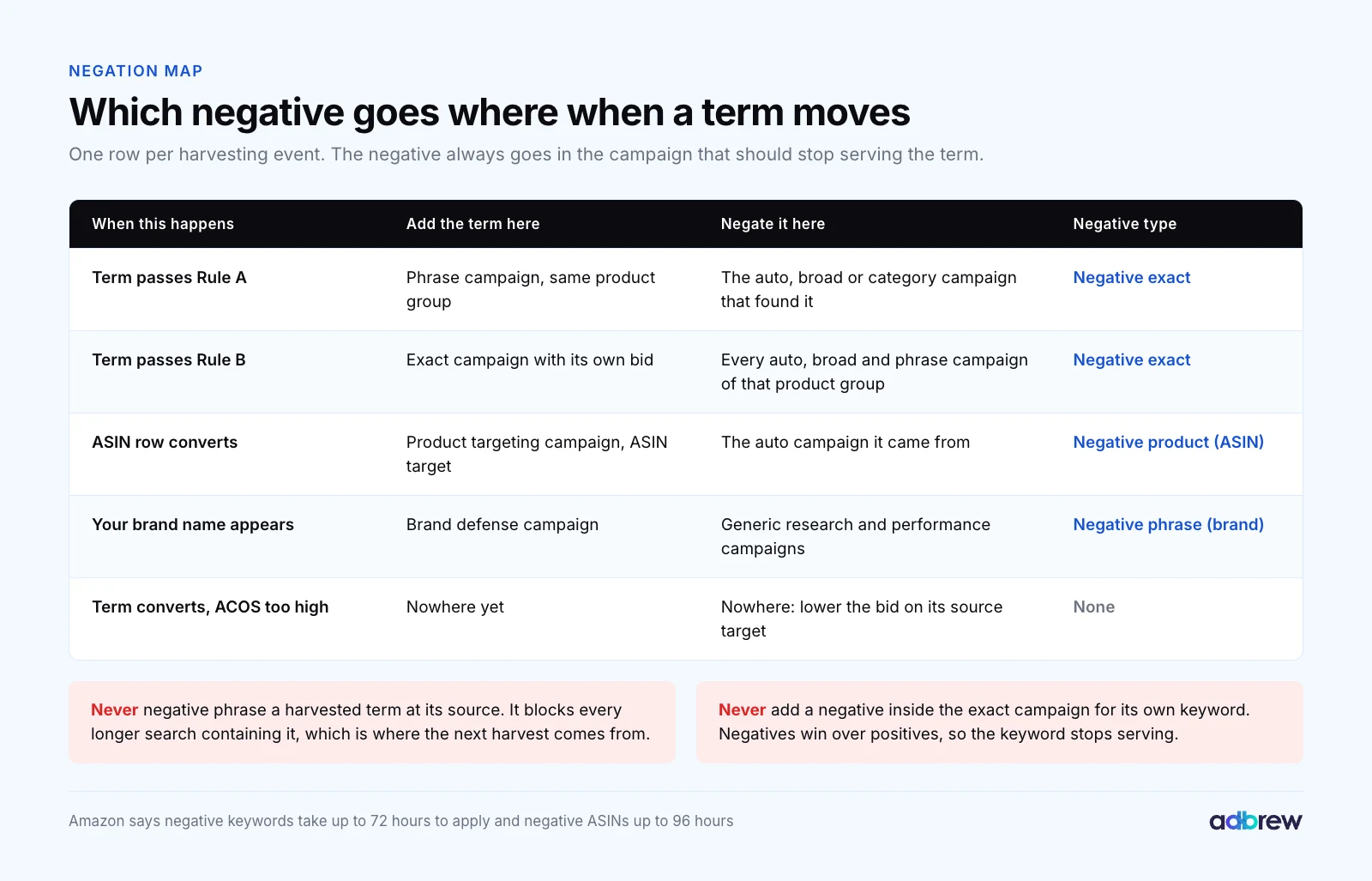
The search term report also shows ASINs, the product pages your ad appeared on. A converting ASIN graduates into a product targeting campaign as an individual ASIN target, and gets a negative product target in the auto campaign it came from.
Your own brand name is a different case. Route it to a brand defense campaign and keep it out of generic campaigns with a negative phrase on the brand name. Brand terms convert at a low ACOS and will make a generic exact campaign look better than it is.
Graduation Thresholds: When a Search Term Is Ready
A graduation threshold is the rule a search term must pass before it moves down the funnel. These are practitioner defaults we start every account on, not Amazon rules, and they move once an account has history.
Rule A, research to phrase: at least 1 order in the last 30 days, ACOS up to 1.5 times target, and a relevant multi-word term.
Rule B, any layer to exact: at least 2 orders in the last 30 days at or under target ACOS. A term that passes Rule B skips phrase.
Both rules run on a 30-day window that excludes the last 7 days. Sponsored Products sales attribute for 7 days after the click for sellers and 14 for vendors, so recent clicks still owe you orders.
1. Work Out How Many Clicks a Rule Needs
The number of clicks a rule needs depends on the product's conversion rate. Clicks per order is 1 ÷ conversion rate, and a two-order rule needs roughly twice that.

Here are two examples with illustrative numbers:
A $35 cutting board converts at 12%, so it takes 8.3 clicks per order and about 17 clicks to expect two orders.
An $18 phone case converts at 6%, so it takes 16.7 clicks per order and about 33 clicks for two orders.
The phone case needs twice the traffic before the same rule can fire. Use the conversion rate of the product in that ad group, not the account average. Our Amazon conversion rate guide shows where to find it.
2. Check ACOS Against Target, Not Against Zero
Two orders isn't enough on its own. The term also has to be profitable at the price it paid.
The cutting board term spent $13.60 on 17 clicks at $0.80 and sold $70: an ACOS of 19.4%, under its 25% target. It graduates.
The phone case term spent $14.85 on 33 clicks at $0.45 and sold $36: an ACOS of 41.3%, over its 30% target. It converts, but too expensively, so it stays in research with a lower bid.
The shortcut is ACOS = CPC ÷ (price × conversion rate). The phone case needs a CPC under 0.30 × $18 × 6% = $0.32 to graduate. Set the target itself from your break-even ACOS, product by product.
3. Why Two Orders and Not One
One order is the most common harvest rule we find in audits, and it promotes too many weak terms. The math is simple binomial probability.

Take a product converting at 10% and a search term that really converts at 5%, half your rate. Within 10 clicks, that weak term gets at least one order 40% of the time. Within 20 clicks, it reaches two orders only 26% of the time.
Going further buys less. Three orders in 30 clicks still lets 19% through, and four in 40 lets 14% through, while every extra order delays each graduation by another 10 clicks.
That's why two orders is our default, and why the ACOS check matters as a second filter. For high-spend head terms, where a wrong promotion is expensive, we raise it to three.
4. Adjust the Rule to the Account
Low conversion rates (under 5%): use a 60-day window, or graduate on Rule A and let phrase collect the second order.
High-price products: a single order can be worth more than the spend. Graduate on one order if ACOS is well under target and clicks are above 1x clicks per order.
Launches: run research at a higher target ACOS on purpose, but keep the graduation rule at the performance target.
Event weeks: pause graduation during Prime Day or Black Friday. Deal-day conversion rates make ordinary terms look like winners.
Our match types guide shows how budget moves between these layers from launch to maturity.
Negation: How to Stop Harvested Terms Cannibalizing Each Other
Every term you graduate must be negated in the campaign it came from. Without it, the same search keeps serving from two campaigns at two bids, and your reports split it in half.
Amazon's targeting guide says "you won't be bidding against yourself" when the same keyword runs in several match types. That's true for the auction price. The problem is control: Amazon picks which of your campaigns serves, and your exact bid stops being the price you actually pay.
1. Use Negative Exact at the Source
Add the graduated term as negative exact in the source campaign. When a term reaches exact, add it as negative exact in every auto, broad and phrase campaign of that product group, not only the one that found it.
Negative exact blocks the term and its close variants, up to 10 words, per Amazon's negative targeting help page. Longer searches that contain it can still serve and be harvested next.
2. Don't Use Negative Phrase for Harvested Terms
Some guides recommend negative phrase at the source to stop broad from matching anything containing the harvested term. We disagree for most accounts.
A negative phrase of "cutting board" blocks "bamboo cutting board with juice groove", which may be your next winner. Keep negative phrase for concepts that never convert, such as "used" or a size you don't sell.
3. Give It 72 Hours Before Judging
Amazon says negative keywords take up to 72 hours to apply and negative ASINs up to 96. A term that still shows in the source campaign two days later isn't a failed negative.
4. Check the Two Campaigns After 14 Days
Two weeks after a graduation, compare the term in exact with its history in research. If clicks in exact are far below what research produced, the exact bid is too low for the auctions it used to win.
Bid Seeding: The First Bid on a Harvested Keyword
Bid seeding is setting the starting bid for a newly harvested keyword. The term already has a history in the source campaign, so use it rather than Amazon's suggested bid.

The formula we use, the same one as in our keywords vs search terms guide, is target ACOS × average order value × conversion rate.
1. Calculate the Seed From the Term's Own Numbers
In the example above (illustrative numbers), the term had 34 clicks, 4 orders, $27.20 spend and $140 sales in auto. That's an 11.8% conversion rate and a $35 order value.
The seed bid is 0.25 × $35 × 11.8% = $1.03. That's the most it can pay per click and still land at a 25% ACOS if it converts the same way in exact.
There's a useful check built in. A term that beat target always seeds above the CPC it paid in the source campaign ($0.80 here), so the new keyword can win the same auctions.
2. Start on Down Only and No Placement Premium
The seed is a ceiling, not the price you'll pay. Placement adjustments and bid rules add together, then dynamic bidding multiplies the result.
A 20% top of search adjustment takes $1.03 to $1.24 at the top of search. Dynamic bids up and down can raise a bid by up to 100%, per Amazon's dynamic bidding guide, so the same keyword could pay up to $2.48.
We start harvested keywords on dynamic bids down only with no placement premium for 14 days. Once the keyword has its own conversion data, our bidding strategies guide covers when to move it to up and down and how to set placement modifiers.
3. Lower the Source Bid Too
Once its best terms leave, the research campaign's average conversion rate falls. That is the point, but its bids were set when the winners were still in it. Review research bids monthly, so discovery stays cheap.
How Often Should You Run Keyword Harvesting?
Weekly is the right cadence for most accounts with steady spend. Daily harvesting mostly reacts to noise, and monthly leaves winners in research at the wrong bid for weeks.

How often | What runs |
|---|---|
Weekly | Rules A and B on a 30-day window skipping the last 7 days; add exact keywords, negatives and seed bids |
Every 2 weeks | Review keywords graduated 14+ days ago; adjust bids or demote ones that fell apart |
Monthly | N-gram analysis across research campaigns, old negatives, layer budgets, Prompts report |
Event weeks | Negate irrelevant terms daily; pause graduation |
Amazon recommends letting an automatic campaign run "for about two weeks" before building manual campaigns from it, in the same targeting guide. For a new product, the first harvest happens around week three.
Save every weekly report. The Sponsored Products search term report has a 65-day lookback, and a 60-day graduation window needs most of it.
How Prompts, Keyword Groups and Amazon Ads Agent Change Harvesting in 2026
More of Amazon's targeting is now chosen by Amazon. That doesn't retire the funnel. It makes the funnel the place where you decide what Amazon's automation is allowed to buy at full price.

1. Prompts Run Inside Your Harvested Campaigns
Sponsored Products and Sponsored Brands prompts opened in beta in November 2025 and became generally available in the US on March 25, 2026. Campaigns are enrolled automatically, prompts use your campaign targeting, and clicks are billed under your CPC.
So prompt spend lands in your exact campaigns too. Check the Prompts report (clicks, spend, sales, ACOS) on performance campaigns monthly and pause prompts that spend without selling. Our post on Sponsored Products and Sponsored Brands AI prompts covers the report.
2. Keyword Groups Are a Research Source
Keyword groups target sets of related keywords Amazon picks from your ASINs, and "continuously refreshes them over time." They are in beta and only available in the US.
We run them in their own research campaign with a capped budget, and graduate the converting search terms they trigger into exact like any other research source.
3. Amazon Ads Agent Recommendations Skip Your Negation Step
Amazon introduced Ads Agent at unBoxed 2025, saying it "reviews thousands of audience segments to recommend the most relevant Amazon audience segments and keywords." On September 29, 2026, Amazon renamed its unified platform Amazon Ads Agent, with Sponsored Products recommendations for targeting, bids and budgets you can apply in one click.
Its conversational features are in closed beta and rolling out, and the recommendations are worth reading. When you accept a keyword, check its match type and whether the term already lives in your exact campaigns.
A one-click keyword doesn't add the matching negative in your research campaigns, so that step is still yours.
4. Seller Assistant Now Harvests for Sellers
At Accelerate in September 2026, Amazon said Seller Assistant's new auto-optimization keeps working on campaigns it drafts: "adding search terms that are performing, pausing those that aren't, and holding every bid under a maximum the seller sets."
That is harvesting run by Amazon. Amazon's recap doesn't say what threshold counts as "performing" or whether the term is negated at the source, so treat those campaigns as their own layer and check them for overlap with your exact keywords.
5. Search Terms Aren't Always Searches
Amazon's search term report page now says it includes terms "inferred as best match to your product in non search context (such as off Amazon placements on social sites)." An inferred term can pass your rule without a shopper ever typing it.
Before graduating an odd-looking term, check that it reads like a real search for your product. If it does, harvest it and judge it again after 14 days in exact.
6. Your Report Feed Is Moving
Unified reporting became generally available on June 8, 2026, and the legacy Sponsored Ads report pages retire on December 31, 2026. If a scheduled search term report feeds your harvest spreadsheet, rebuild it in unified reporting before then.
A Note on Walmart
Walmart Connect added negative keywords for Sponsored Products in July 2026, for manual campaigns and for automatic campaigns using fixed bidding. That makes the same harvest-and-negate funnel possible on Walmart for the first time. Our guide to Walmart automated rules covers rule-based management on Walmart.
What to Automate and What to Review by Hand
Harvesting is a rules job, which is why it should be automated. The judgement calls around it are not.
Automate | Review by hand |
|---|---|
Pulling the search term data on schedule | Whether brand and competitor terms go to their own campaigns |
Applying Rules A and B with the 7-day buffer | Odd-looking and inferred terms before they graduate |
Adding the exact keyword and the negative exact at source in one step | Any negative phrase, because one can block thousands of searches |
Seeding the first bid from the term's own history | High-spend head terms close to the threshold |
Logging every change with the rule that made it | Keywords that underperform in exact after 14 days |
Flagging terms that converted at too high an ACOS | Amazon Ads Agent and Seller Assistant changes that overlap your exact keywords |
The left column is where hours go. The right column is where accounts get damaged, so it stays with a person.
Mistakes We See in Real Accounts
Harvesting on one order. A term converting at half your rate passes 40% of the time on a one-order, 10-click rule.
Judging the last 7 days. Recent clicks haven't finished attributing, so good terms look like they have no orders yet.
Harvesting without negating at the source. The term serves from two campaigns and your exact bid stops setting the price.
Negative phrase at the source. It blocks the long-tail variants the next harvest would have found.
Copying the auto campaign's default bid. The exact keyword then can't outbid the campaign it came from.
Harvesting brand terms into generic exact campaigns. Their low ACOS hides how generic terms really perform.
Never revisiting graduates. A term that worked in March may not in October. Demote or re-bid it.
A full Amazon PPC audit checks for all of these alongside bids, budgets and structure.
How We Run Keyword Harvesting in Adbrew
Everything above works by hand: one scheduled report, a spreadsheet with two rules, an hour a week per account. At twenty accounts it becomes the job that slips first.
Adbrew is an agentic retail media management platform for Amazon and Walmart, and the harvesting funnel runs inside it on rules you set and can read:
Rules for harvesting, negation, bids and budgets. You choose the lookback, thresholds, target ACOS and guardrails. A converting term moves into exact and is negated at the source in the same step.
Guardrails you control. Keep brand terms, visibility keywords and specific campaigns out of automation, and every change is logged with the rule that made it.
Search terms and bulk actions in one place. Review terms across every campaign in Sponsored Ads management and act on them with bulk operations.
Agents for the review column. Ask Adbrew Intelligence for "search terms with two or more orders under target ACOS that aren't in an exact campaign yet", or for every keyword graduated last month that's now above target. Through the Adbrew MCP server, the same works from Claude or ChatGPT, and nothing applies until you approve it.
Brands on Adbrew cut ACOS by 46% on average, and Seller Presto saves more than 250 hours of manual optimization a month. Search term work is a large share of those hours.
Build the Funnel Once, Then Run It Every Week
Keyword harvesting is two rules, a negation step and a seeded bid, repeated every week. Done consistently, it moves spend from guessing to proven searches at prices you set.
Want to see harvesting, negation and bid rules running on your account, with every change logged? Book a demo and we'll walk through your search terms with you.
Frequently Asked Questions
What is keyword harvesting on Amazon?
Keyword harvesting on Amazon is moving search terms that convert in auto, broad or category campaigns into exact match keywords or ASIN targets with their own bids. The harvested term is then added as a negative exact in the source campaign, so only the new exact keyword serves that search.
How many orders should a search term have before I harvest it?
A sound default is two orders in the last 30 days at or under your target ACOS, ignoring the most recent 7 days. One order lets too many weak terms through. For low-converting products, use a 60-day window or move one-order terms into phrase first.
How many clicks does a search term need before harvesting?
It depends on conversion rate. Clicks per order is 1 divided by conversion rate, and a two-order rule needs about twice that. At a 12% conversion rate that is about 17 clicks. At 6% it is about 33 clicks.
Should I negate a harvested keyword in the auto campaign?
Yes. Add the harvested term as a negative exact in the auto or broad campaign it came from, and in any phrase campaign of the same product group. Use negative exact rather than negative phrase, so longer searches containing the term can still be discovered.
What bid should I use for a harvested keyword?
Start with target ACOS times average order value times the term's own conversion rate. For a term with an 11.8% conversion rate, a $35 order value and a 25% target, that is $1.03. Start on dynamic bids down only and review after 14 days.
How often should I harvest keywords on Amazon?
Weekly suits most accounts with steady spend. Run the rules on a 30-day window that skips the last 7 days, review graduated keywords after 14 days and do a monthly pass on n-grams, old negatives and budgets. Pause graduation during big sales events.
Can keyword harvesting be automated?
Yes. Pulling the search term report, applying graduation rules, adding exact keywords, negating at the source and seeding bids are all rule-based and suit automation. Keep brand terms, inferred terms, negative phrases and Amazon's own recommendations under human review.
Do Prompts and Amazon Ads Agent replace keyword harvesting?
No. Prompts run on your existing campaign targeting, and Amazon Ads Agent recommends keywords, bids and budgets that land in your campaigns. Neither negates a term at its source for you, so a harvesting funnel is what keeps those additions from overlapping your exact keywords.